JBL Charge 6 Portable Bluetooth Speaker, Waterproof, Drop-Proof - Black | Long Battery Life Up To 28 Hours, Quick Charging, Built-In Powerbank, Weatherproof For Outdoor, Poolside, And Shower Use
$151.99 (as of September 19, 2026 09:29 GMT +00:00 - More infoProduct prices and availability are accurate as of the date/time indicated and are subject to change. Any price and availability information displayed on [relevant Amazon Site(s), as applicable] at the time of purchase will apply to the purchase of this product.)You’re building a product page for a T-shirt available in 12 colors and 10 sizes. That’s 120 variants. The shopify product variants limit 100 rule means Shopify won’t let you publish it as a single product. You hit the cap, and the product is incomplete.
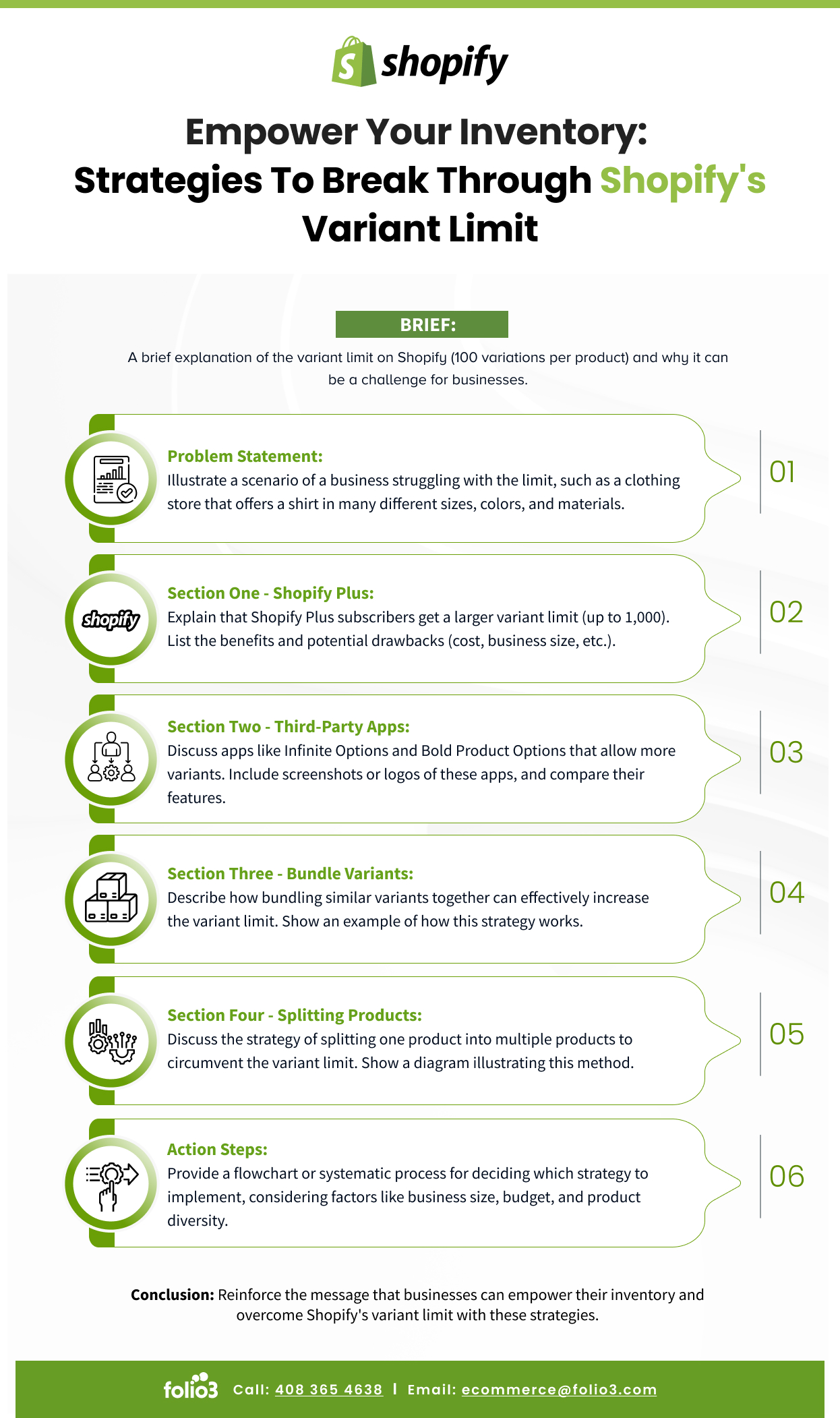
The Shopify variants limit is a structural constraint that catches merchants off guard when they’re scaling a catalog. It doesn’t affect stores with simple products. But any store managing combinations of color, size, material, or custom specifications will eventually run into it. This guide explains the limit in plain terms, covers which store types are most affected, and walks through every practical workaround available in 2026 — from third-party apps to headless commerce approaches.
Summary
- Shopify enforces a hard limit of 100 variants per product with a maximum of 3 options (e.g. size, color, material)
- This limit affects stores with large variant catalogs — apparel, footwear, paint, custom products, and sporting goods most commonly hit the ceiling
- Three main workarounds exist: third-party variant apps, Shopify metafields with custom storefronts, and product splitting
- Apps like Infinite Options by Shop Circle and Product Options & Customizer extend variant functionality without the 100-variant cap
- Shopify Plus merchants can access additional customization through the Storefront API and checkout extensibility
Why the Shopify Variants Limit Matters
You’re building a product page for a T-shirt available in 12 colors and 10 sizes. That’s 120 variants. The shopify product variants limit 100 rule means Shopify won’t let you publish it as a single product. You hit the cap, and the product is incomplete.
The Shopify variants limit is a structural constraint that catches merchants off guard when they’re scaling a catalog. It doesn’t affect stores with simple products — a candle with three scents is fine. But any store with combinations of color, size, material, or custom specifications will eventually run into it.
This guide explains exactly what the limit is, why it exists, which types of stores are most affected, and the practical options for getting past it in 2026.
For stores considering migrating to a platform with more flexible variant handling, our Shopify development guides cover the full range of options.
What Is the Shopify Variants Limit?
The Hard Numbers
| Constraint | Limit |
| Variants per product | 100 |
| Options per product | 3 |
| Option values per option | Unlimited |
| SKUs per store | Unlimited |
| Products per store | Unlimited |
The limit is: 3 shopify variant options × combinations = maximum 100 variants per product.
So a product with Color (10 values) × Size (10 values) = 100 variants is exactly at the limit. Add one more color or one more size, and you can’t save the product without removing something.
What Counts as a Variant?
Each unique combination of shopify variant options creates one variant. A shirt with 3 colors and 3 sizes has 9 variants. A shoe with 5 colors, 12 sizes, and 2 widths has 120 variants — 20 over the limit.
The 3 shopify variant options restriction is separate from the 100-variant cap. Even if your combinations don’t exceed 100, you can’t add a fourth option type (e.g., adding “material” to an existing color + size + fit product).

Which Stores Hit the Shopify Product Variants Limit
These categories run into the shopify product variants limit most often:
- Apparel and footwear — Size, color, and width or fit combinations routinely exceed 100. A single footwear SKU with half sizes and multiple widths can hit the limit before you’ve finished the color range.
- Paint and coatings — Thousands of color options make a single-product approach impossible. Most paint retailers use workarounds from day one.
- Custom or personalized products — Text, font, color, and size combinations multiply quickly. A customizable phone case can easily exceed 100 combinations.
- Sporting goods and equipment — Specifications like draw weight, length, material grade, and color are all meaningful product attributes that buyers use to select correctly.
- Fabric and craft supplies — Yardage, color, weight, and fiber content create variant complexity at the catalog level.
Option 1: Third-Party Variant Apps
The most common solution. Several apps on the Shopify App Store extend variant handling beyond the native limit.
Infinite Options by Shop Circle
Previously known as Infinite Product Options, this app lets you add unlimited options to products beyond Shopify’s three-option limit. Options are presented as custom fields at checkout rather than true Shopify variants — which means they don’t create individual inventory-tracked SKUs automatically.
Works best for: Custom or personalized products where individual SKU tracking isn’t required for each option combination.
Limitation: Options added through the app aren’t native Shopify variants, so inventory management per option combination requires additional setup.
Product Options & Customizer by Shopify
A Shopify-built app (different from the native variant system) that adds conditional logic to options — showing or hiding options based on previous selections. Useful for products where not every combination is available.
Variants Robot
Designed specifically for the over-100-variant problem. Lets you create “linked products” that appear as a single product to the buyer while distributing variants across multiple underlying Shopify products.
Works best for: Apparel and footwear where buyers need to see all options together but inventory tracks at the individual SKU level.
Product Variants Reloaded by Sellerdash
Lets you merge multiple Shopify products into a single product display with a combined variant selector. Shopify still sees them as separate products; the buyer sees one unified product page.
App Comparison
| App | Approach | Inventory Tracking | Best For |
| Infinite Options | Custom fields beyond 3 options | Manual / external | Personalized products |
| Variants Robot | Linked products, unified display | Native per product | Apparel, footwear |
| Product Variants Reloaded | Merged product display | Native per product | Large option catalogs |
| Product Options & Customizer | Conditional option logic | Custom | Complex selection flows |
Option 2: Product Splitting
The simplest workaround, though it creates SEO and UX considerations.
How It Works
Split a product with 150 variants into two or three products, each under 100 variants. A shoe with 15 colors and 12 sizes (180 variants) becomes two products: “Shoe — Colors A through H” and “Shoe — Colors I through O.”
The Problems
- SEO fragmentation: Each product page competes for the same search intent. Two pages for the same product dilutes the link equity and ranking potential for that query.
- Buyer confusion: A customer searching for a specific color may land on the wrong product page. Cross-linking between split products helps, but adds friction.
- Reviews splitting: Product reviews accumulate separately on each split product, making both look less established than a single consolidated page would.
Product splitting is best as a short-term fix while you implement a proper app-based solution, or for products where the option ranges are genuinely distinct enough that separate pages make semantic sense.
Option 3: Shopify Metafields and Custom Storefront
For stores with technical development resources, Shopify metafields combined with the Storefront API create a more robust solution.
How It Works
Store extended product data (additional options, specifications, availability per combination) in metafields. Use the Storefront API to query that data and render a custom variant selector on the product page — one that isn’t constrained by Shopify’s native 3-option / 100-variant limit.
Inventory management still requires workarounds at scale, but this approach allows a single product page with an unlimited number of selectable options.
Who This Is For
This approach requires either in-house developer capacity or a Shopify development agency with Storefront API experience. It’s not practical for most small stores but is the most scalable solution for catalogs that regularly need 200+ variant combinations.
Option 4: Headless Commerce on Shopify
Shopify’s Storefront API supports headless architectures where the frontend is completely decoupled from Shopify’s admin. In a headless setup, the variant display logic is fully custom — you’re not constrained by Shopify’s native product model.
Products can be structured however your catalog requires. Variant selection, inventory display, and add-to-cart logic all live in your custom frontend, with Shopify handling inventory, orders, and fulfillment in the background.
Practical consideration: Headless Shopify development is a significant investment. It makes sense for stores processing significant revenue (typically $500k+/year) where the catalog flexibility directly impacts conversion and operations.
How to Add Variants on Shopify: Native Process
Knowing how to add variants on Shopify through the native admin helps you stay under the limit before turning to workarounds — especially if you’re approaching the limit but haven’t hit it.
Adding Variants to a New Product
Here’s exactly how to add variants on Shopify for a new product:
- From Shopify admin, go to Products → Add product
- Scroll to the Variants section
- Click Add options like size or color
- Enter your option name (Color, Size, Material)
- Enter option values (Red, Blue, Green)
- Add a second and third option if needed
- Shopify auto-generates all combinations as variants
- Set price, SKU, barcode, and inventory for each variant
- Click Save
Adding Variants to an Existing Product
- Go to Products → All products
- Click the product name
- In the Variants section, click Add variant or Edit options
- Add new option values
- Set inventory and pricing for new variants
- Click Save
Shopify Multiple Variants Dropdowns
By default, Shopify displays variants as dropdown selectors. The theme controls the display format. Some themes support swatch-style selectors (color circles, size buttons) natively; others require an app or theme customization to enable visual selectors.
If your theme only shows dropdowns and you want swatches, the options are: use a theme that supports swatches natively, install a swatch app, or add custom code to your theme’s product template.
Shopify vs. Other Platforms on Variant Limits
If the variant limit is a persistent constraint for your business model, it’s worth understanding how other platforms handle this.
| Platform | Variant Limit | Options Limit |
| Shopify | 100 per product | 3 |
| BigCommerce | 600 per product | 250 option values |
| WooCommerce | Unlimited (with limitations) | Unlimited |
| Magento | Unlimited | Unlimited |
BigCommerce’s variant system is more flexible out of the box — up to 600 variants per product and a modifier system that handles additional selection inputs without the 3-option ceiling. For stores that regularly need 200+ variant combinations and don’t want to use apps or workarounds, this is worth considering as part of a platform decision.
Which Solution Should You Choose?
| Scenario | Recommended Approach |
| Custom/personalized products, no inventory per combo needed | Infinite Options or Product Options & Customizer |
| Apparel/footwear with 100–300 variant combinations | Variants Robot or Product Variants Reloaded |
| Paint, craft, or color-heavy catalog (1000+ combinations) | Metafields + Storefront API or headless |
| High-volume store, technical team available | Headless Shopify |
| Small store, just over the limit by a few variants | Product splitting (short-term) |
Key Takeaways
- Shopify’s variant limit is 100 per product and 3 options per product — this is a hard limit that cannot be changed in the admin
- Third-party apps (Variants Robot, Infinite Options, Product Variants Reloaded) are the most accessible workaround for most stores
- Product splitting is a quick fix but creates SEO and review fragmentation — it’s not a long-term solution for most catalogs
- Metafields and the Storefront API provide a scalable, native-feeling solution for stores with development resources
- If the variant limit is a recurring pain point, BigCommerce’s 600-variant limit may be worth evaluating as part of a platform review
Frequently Asked Questions
What Is the Shopify Variants Limit?
The shopify product variants limit 100 rule means Shopify allows a maximum of 100 variants per product, with a maximum of 3 options (e.g., size, color, material). Each unique combination of option values counts as one variant. This limit cannot be increased on any Shopify plan through native settings.
How Do I Add More Than 100 Variants on Shopify?
Use a third-party app such as Variants Robot, Infinite Options, or Product Variants Reloaded. These apps present a unified product page while distributing variants across multiple underlying products or adding custom options fields that aren’t bound by the native 100-variant cap.
Can Shopify Plus Override the Variants Limit?
No. The 100-variant limit applies to all Shopify plans including Shopify Plus. Plus merchants have access to the Storefront API, which enables custom frontend variant logic, but the underlying product model still caps at 100 variants per product.
What Happens if I Split Products to Get Around the Limit?
Product splitting works technically but fragments SEO value, splits customer reviews across pages, and can confuse buyers navigating a product with many options. It’s a viable short-term fix but creates problems at scale.
What Is the Best App to Bypass the Shopify Product Variants Limit?
Variants Robot and Product Variants Reloaded are the most commonly recommended for stores with genuine 100+ variant catalogs (apparel, footwear). Infinite Options is better suited for custom or personalized products where per-option inventory tracking isn’t required.
Does BigCommerce Have a Higher Variant Limit Than Shopify?
Yes. BigCommerce allows up to 600 variants per product and has a modifier system that supports additional selection inputs beyond the core variant structure. For stores where the Shopify variant limit is a consistent operational challenge, this is worth evaluating.
How Do I Add Shopify Multiple Variants Dropdowns?
Shopify multiple variants dropdowns appear automatically when you create more than one product option. Shopify adds dropdown variant selectors by default. Changing from dropdowns to swatches requires either a theme that supports swatches natively or an app like Swatches King or Color Swatches PRO. Some theme customization can also add swatch functionality without an app.
The Shopify variants limit is a real constraint — but it’s a solvable one. Most stores hit the ceiling once and then put a permanent solution in place. The right solution depends on your catalog structure, your technical resources, and how often the limit affects your day-to-day product management.
For help evaluating which approach is right for your store or implementing a custom variant solution, talk to our Shopify team.
Source: https://ecommerce.folio3.com/blog/shopify-variants-limit/