Gueray CD Player Portable Bluetooth Desktop CD Players for Home | Portable CD Player with Bluetooth with Timer Built-in HiFi Speakers with LCD Screen Display Boombox FM Radio USB Type-C
$30.66 (as of September 19, 2026 09:29 GMT +00:00 - More infoProduct prices and availability are accurate as of the date/time indicated and are subject to change. Any price and availability information displayed on [relevant Amazon Site(s), as applicable] at the time of purchase will apply to the purchase of this product.)Selling physical products means warehouses, shipping, and inventory headaches. Digital products eliminate all three — and Shopify makes it straightforward to sell them at scale.
Whether you’re selling printables, software, courses, or templates, this guide walks you through how to sell digital products on Shopify from setup to first sale.
You’ll learn which apps to use, how delivery works, what product types convert best, and the mistakes most sellers make early on.
Summary
- Shopify doesn’t deliver digital files natively — you need a third-party app like Sky Pilot or SendOwl
- Best-selling digital product categories include templates, ebooks, music, software, and printables
- Pricing, licensing, and file protection are the three most overlooked setup steps
- Shopify handles tax collection for digital goods differently by region — this matters at checkout
- You can sell digital products on Shopify alongside physical products in the same store
Can You Sell Digital Products on Shopify?
Yes — but with one important caveat. Shopify doesn’t have built-in digital file delivery. When a customer buys a digital product, Shopify processes the payment, but you need a dedicated app to automatically deliver the file or access link.
Apps like Sky Pilot, SendOwl, and Fileflare connect directly to Shopify and handle secure delivery, download limits, and license key generation. Without one of these, you’d be emailing files manually, which doesn’t scale.
What Types of Digital Products Sell Well on Shopify?
High-Performing Digital Product Categories
Not all digital products are equal. The categories below have the strongest track record on Shopify based on market demand and margin potential.
| Product Type | Examples | Avg. Margin |
| Printables | Planners, wall art, templates | 85–95% |
| Digital templates | Canva, Notion, Excel templates | 80–90% |
| Ebooks & guides | How-to guides, recipe books | 90–98% |
| Software & plugins | Tools, scripts, WordPress plugins | 70–85% |
| Music & audio | Beats, sound packs, jingles | 80–92% |
| Online courses | Video lessons, mini-courses | 60–80% |
Selling printables on Shopify is particularly accessible for solo creators. Selling software on Shopify, on the other hand, requires more setup around licensing and delivery but commands higher price points.
If you’re building out a broader store, explore how Shopify metaobjects can help you add rich product data like license tiers and file format details to your listings.

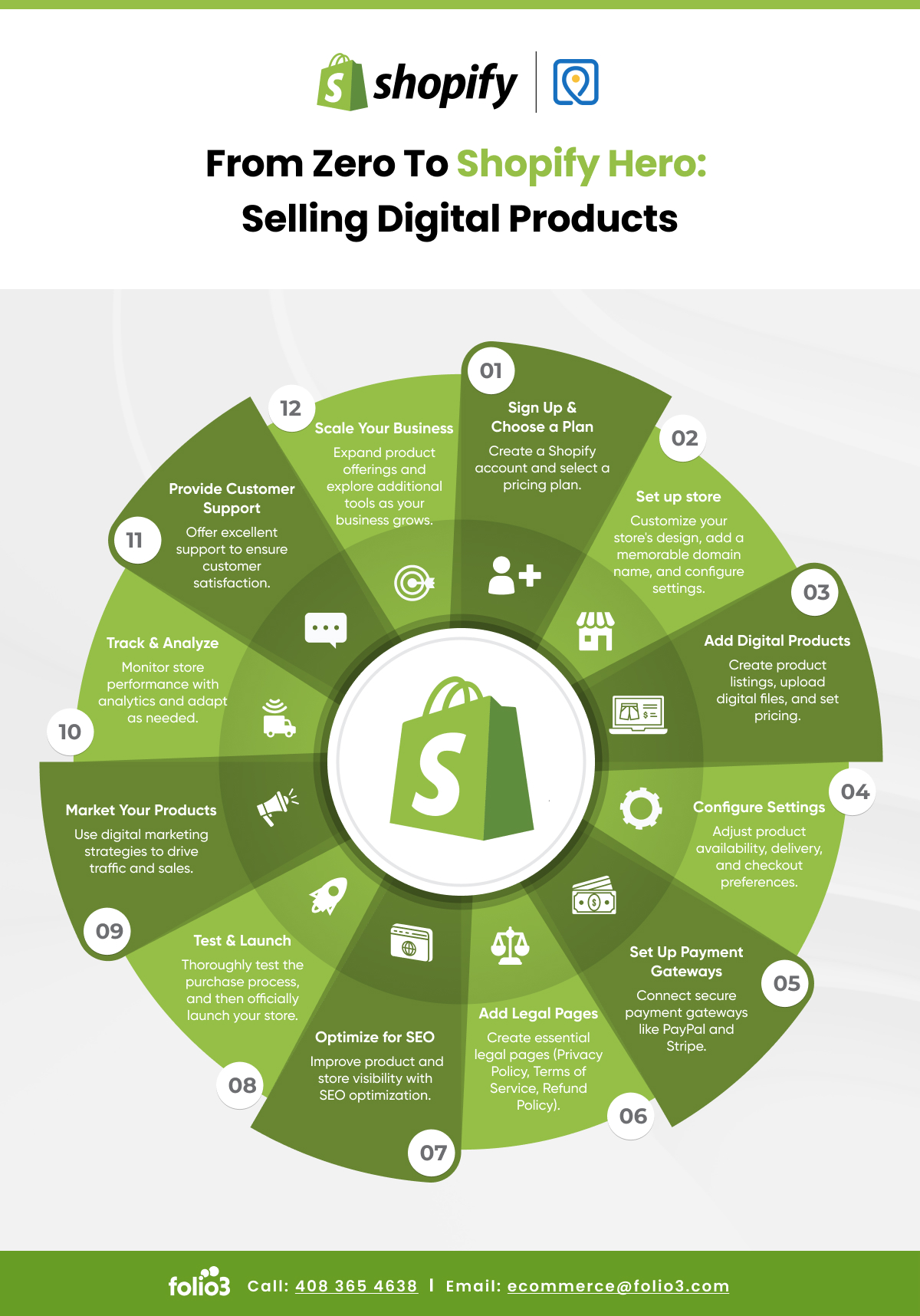
How to Set Up Digital Products on Shopify: Step by Step
Step 1: Choose Your Digital Delivery App
Install a digital delivery app from the Shopify App Store before you list your first product. Popular options include Sky Pilot (great for files and video), SendOwl (strong for licensing and subscriptions), and Fileflare (lightweight and affordable).
Step 2: Create a Product Listing
Go to Products → Add Product in your Shopify admin. Set the product type to “Digital product” and uncheck “This is a physical product” so Shopify skips shipping at checkout.
Step 3: Upload Your File
Within your delivery app, upload the file and link it to the Shopify product. Set download limits (e.g., 3 downloads per purchase) and an expiry window if needed. This protects your content without frustrating buyers.
Step 4: Configure Taxes
Digital goods are taxed differently depending on the buyer’s location. In the EU, digital products are subject to VAT regardless of seller location. Shopify can auto-apply tax rules if you configure your tax settings correctly — check this before going live.
Step 5: Test the Purchase Flow
Place a test order using Shopify’s Bogus Gateway to confirm the delivery email sends correctly and the download link works. This is the step most sellers skip — and then discover the issue only after a real customer complains.
Pricing Strategies for Digital Products
Don’t Race to the Bottom
Digital products are often under-priced. Because there’s no physical cost, sellers assume they must charge very little. In practice, pricing too low signals low quality. A $5 Notion template and a $47 Notion template can have the same content — perceived value drives conversion, not price alone.
| Strategy | Best For | Example |
| Flat pricing | Single-use files, printables | $12 planner template |
| Tiered pricing | Bundles, extended licenses | $27 basic / $97 commercial |
| Subscription | Ongoing content, tool updates | $9/month template club |
| Pay-what-you-want | Community building, early traction | Min $5, avg $14 |

How to Market Digital Products on Shopify
Build Your Product Page for Conversion
Digital products don’t have physical dimensions, weight, or tactile qualities — so your product page has to do more work. The strongest-converting digital product pages include a clear mock-up or preview image (even a flat-lay of a printed version works for printables), a short benefit-led description that answers “what will I be able to do after buying this?”, and at least one sample or preview file so buyers can assess quality before committing.
Social proof matters here more than in physical retail. A single testimonial from a real buyer — especially one that describes a specific outcome — consistently outperforms generic five-star ratings. If you’re just launching, offer the product to a small group for free in exchange for honest feedback, then use that as your initial social proof.
Use SEO to Drive Free Traffic to Your Digital Products
Unlike physical products where Amazon and marketplace SEO dominate, digital products on Shopify benefit significantly from Google search traffic. People actively search for specific templates, tools, and guides by name. A well-optimized product page — with the search term in the title, a descriptive URL slug, and a meta description that communicates the outcome — can generate consistent organic traffic without ad spend.
Blog content that supports your digital product is particularly powerful. A Canva template store, for example, can drive significant traffic by publishing how-to content around the specific use cases their templates address. Each blog post becomes a discovery path that leads into the product.
Deliver an Exceptional Post-Purchase Experience
The download confirmation email is the most-opened email in any digital product business — open rates routinely exceed 80%. Most sellers use the default delivery email from their app and leave it there. A better approach: customize the email to include a warm message, a quick-start tip for using the product, and a subtle prompt to leave a review or share on social media.
A follow-up email 48–72 hours after purchase asking if the customer had any issues accessing their file also reduces support tickets significantly. Many download problems go unreported — customers just don’t come back.
Protect Your Digital Files Without Over-Restricting Access
File protection is a balance. Setting download limits too low (e.g., one download only) frustrates legitimate buyers who switch devices or lose files. Setting no limits at all makes it trivial to share a paid file across an entire forum. A practical middle ground: 3–5 downloads per purchase with a 6–12 month expiry window. This covers genuine access needs while creating enough friction to discourage casual piracy.
For software products, license key generation through SendOwl or a similar tool adds a meaningful layer of protection beyond download limits alone.

Common Mistakes When Selling Digital Products on Shopify
- Not setting up an automated delivery app — leads to manual fulfillment and missed orders
- Forgetting to disable shipping at checkout — customers get prompted for a delivery address
- Skipping file protection — unlimited downloads and no license control erodes value
- Ignoring regional digital tax rules — can create compliance issues at scale
- Using low-quality preview images — digital product pages live or die by their visuals
For checkout configuration help, see our guide on Shopify payment gateways to ensure your payment setup supports digital product purchases smoothly.
Key Takeaways
- Shopify supports digital product sales but requires a third-party delivery app
- Printables, templates, and ebooks are the easiest starting categories
- Price based on perceived value, not cost — digital products have near-zero COGS
- Always test the full purchase and delivery flow before going live
- Tax configuration for digital goods varies by region and must be set up correctly in Shopify
Conclusion
Selling digital products on Shopify is one of the most efficient business models available — low overhead, instant delivery, and infinite scalability. The setup takes a few hours, not weeks. Use the steps above to get your store live, price your products confidently, and let automation handle delivery. If you want help configuring your Shopify store for digital sales, talk to the Folio3 team.
FAQs
Can I Sell Digital Products on Shopify Without an App?
Not effectively. Shopify doesn’t natively deliver digital files. You can manually email files after purchase, but this doesn’t scale. A digital delivery app automates fulfillment, sets download limits, and handles secure access.
What Is the Best App for Selling Digital Products on Shopify?
Sky Pilot works well for file and video delivery. SendOwl is strong for licenses and subscriptions. Fileflare is a lightweight option for basic file sales. The right choice depends on your product type and volume.
Do I Need to Charge Sales Tax on Digital Products?
It depends on your location and your customer’s location. The EU requires VAT on all digital goods sold to EU buyers. In the US, rules vary by state. Configure Shopify’s tax settings and consult a tax professional for cross-border sales.
Can I Sell Both Physical and Digital Products in the Same Shopify Store?
Yes. Shopify handles both in the same store. You mark each product as physical or digital, and the checkout flow adjusts accordingly — shipping is skipped for digital items.
Source: https://ecommerce.folio3.com/blog/selling-digital-products-on-shopify/