Soundcore Select 4 Go Bluetooth Shower Speaker by Anker, IP67 | 20H Playtime, Floatable, Dustproof, Ultra-Portable Bluetooth Speaker, Powerful Sound, Electronics for Outdoors/Home/Travel
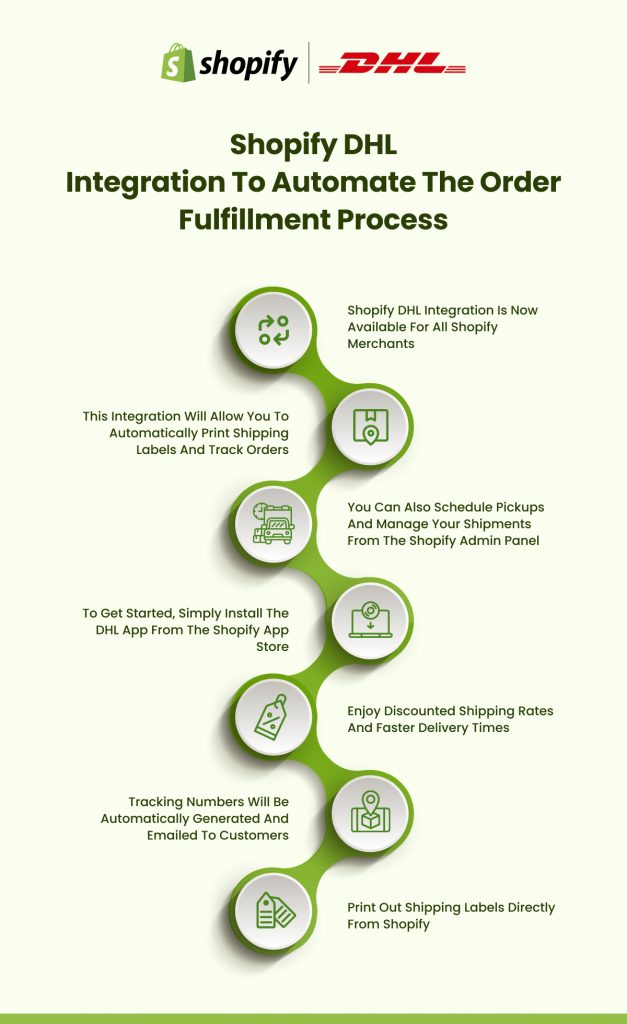
$21.84 (as of October 1, 2026 13:41 GMT +00:00 - More infoProduct prices and availability are accurate as of the date/time indicated and are subject to change. Any price and availability information displayed on [relevant Amazon Site(s), as applicable] at the time of purchase will apply to the purchase of this product.)The Shopify DHL integration connects your store with one of the world’s most trusted logistics providers, enabling you to automate shipping workflows, display real-time rates, and reach customers in over 220 countries. You’ll be able to print shipping labels directly from your Shopify dashboard and provide accurate delivery estimates at checkout.
Summary
- DHL Express Commerce App provides official integration with automated order import and batch label printing
- Real-time shipping rates at checkout eliminate manual calculations based on weight, dimensions, and destination
- Paperless customs clearance speeds international deliveries via electronic documentation submission
- Free pickup scheduling from Shopify admin within 1-7 days advance notice
- Multiple integration options include official DHL apps, third-party solutions, and custom API implementations
- Cost savings through negotiated Shopify rates and reduced manual processing
What Is Shopify DHL Integration?
Shopify DHL integration connects your online store with DHL’s global shipping network through apps, plugins, or API connections. When a customer places an order, the integration automatically calculates rates, generates shipping labels, and updates tracking information—all without leaving the Shopify platform.
Why Integrate DHL with Shopify?
- Global Reach: DHL Express delivers to 220+ countries with 2-3 day international delivery. The network includes dedicated customs brokers that reduce clearance delays.
- Automated Workflows: Orders automatically import to the shipping system. You can print labels in batches and tracking numbers populate without manual entry, freeing up time for higher-value activities.
- Accurate Real-Time Rates: The integration calculates exact costs based on package weight, dimensions, origin, and destination. Customers see precise shipping costs at checkout, improving conversion rates.
- Professional Customs Documentation: The system generates commercial invoices and customs declarations automatically. For Paperless Trade destinations, documentation submits electronically—you print only the shipping label.
DHL Express vs. DHL eCommerce: Which Service to Choose?
DHL operates two distinct services for Shopify merchants, each designed for different business models and shipping patterns.
| Feature | DHL Express | DHL eCommerce |
| Primary Focus | International express shipping | Domestic & economy international |
| Delivery Speed | 2-3 days internationally | 5-10 days (varies by service) |
| Best For | High-value products, urgent shipments | High-volume shippers, budget-conscious customers |
| Coverage | 220+ countries/territories | Select domestic & international routes |
| Tracking | Comprehensive end-to-end | Standard tracking (varies by service) |
| Insurance | Included with shipments | Available as add-on |
| Free Pickups | Yes (through Shopify integration) | Varies by location |
| Customs Support | Full brokerage services | Basic customs documentation |
| Signature Required | Standard (except Canada) | Optional |
| U.S. Domestic Shipping | Not available via Shopify | Available |
DHL Express
DHL Express specializes in international shipping with guaranteed delivery timeframes and complete customs clearance support.
Best for: International shipping, high-value products, businesses with customers expecting fast delivery.
Limitations: Ships only internationally from continental U.S. (excludes Hawaii, Alaska, Puerto Rico), no domestic U.S. shipping via Shopify integration, no P.O. box deliveries.
DHL eCommerce
DHL eCommerce focuses on domestic shipping and high-volume international parcels at economy rates with longer transit times than Express.
Best for: High-volume shippers, economy international shipping, lightweight packages.
Most Shopify merchants shipping internationally choose DHL Express for speed and reliability. Shopify FedEx integration offers similar service levels.
How to Integrate DHL with Shopify: Step-by-Step Setup
Prerequisites Before You Start
Before beginning, verify you have:
- An active Shopify store on any paid plan
- A DHL Express business account (free registration, 1-3 days approval)
- Products with accurate weights and dimensions
- Configured shipping zones for target markets
Shopify Advanced plan includes carrier-calculated shipping. Basic and Shopify plans need to purchase this add-on ($20/month) for live rates at checkout.
Step 1: Create Your DHL Express Account
Visit the DHL Express website and complete business account registration. DHL approves accounts within 1-3 business days. Save your account number and API credentials for setup.
Step 2: Install the DHL Express Commerce App
Navigate to Shopify App Store, search “DHL Express Commerce,” and install the official DHL app. Authorize the connection to access order data and shipping settings.
Step 3: Connect Your DHL Account
Open the DHL app from Shopify admin, enter your DHL account number and API credentials, and select your default origin address. Contact DHL support (1-800-225-5345) if you need API activation.
Step 4: Configure Shipping Services and Rates
In the DHL app, activate checkout rates. Then go to Settings > Shipping and delivery in Shopify. For each shipping zone, add a rate and select “Use carrier or app to calculate rates.” Choose “DHL Commerce” and select which services to offer (Express Worldwide, Express 9:00, Express 12:00, etc.).
Step 5: Set Up Rate Calculation Method
Return to the DHL Express Commerce app settings and select your rate calculation method. Understanding each option helps you choose the best fit for your packaging practices.
Rate Calculation Methods Explained
| Method | How It Works | Best For | Pros | Cons |
| Single package using sum of item weights | Totals all item weights; treats order as one package | Orders with multiple small items of similar size | Simple, fast calculation | May underestimate costs for bulky items |
| Integration using item dimensions and weights | Uses actual product dimensions from Shopify catalog | Accurately sized products with complete data | Most accurate rates | Requires complete product dimension data |
| Default package dimensions | Uses standard package size regardless of product specs | Standardized packaging operations | Consistent, predictable rates | May overcharge for small items |
| Unique packages per item | Each product ships separately with own tracking | High-value items, fragile products | Individual tracking per item | Higher costs, limited Shopify availability |
Most merchants start with the first option and refine based on their packaging practices.
Step 6: Test the Integration
Place a test order to verify DHL rates appear correctly and shipping labels generate properly. Cancel the test order after verification.
Step 7: Configure Additional Settings
Enable pickup scheduling, automated tracking emails, add harmonized codes for products, and set up return label generation if needed. Understanding Shopify shipping rates helps optimize your overall strategy.
Key Features of DHL Express Commerce for Shopify
- Batch Label Printing: Select multiple orders and generate all shipping labels simultaneously, significantly reducing fulfillment time.
- Automated Order Synchronization: New orders automatically appear in the DHL dashboard with tracking numbers updating in Shopify without manual entry.
- Paperless Trade: For supported countries, customs documentation submits electronically—you print only the shipping label, speeding up clearance by 1-2 days.
- Free Pickup Scheduling: Schedule pickups 1-7 days in advance from your Shopify admin. DHL collects packages at no charge.
- Real-Time Tracking: Tracking updates appear in Shopify order details and automated customer emails, reducing support inquiries.
- Service Level Customization: Offer customers multiple delivery speed options including guaranteed 9 AM or noon delivery.
Alternative Ways to Connect Shopify to DHL
Beyond the official DHL Express Commerce app, several other integration methods suit different business needs.
Integration Methods Comparison
| Method | Best For | Monthly Cost | Key Features | Setup Complexity |
| DHL Express Commerce App | Most merchants, international shipping focus | Free | Official integration, batch labels, paperless customs, free pickups | Low – Easy setup |
| ShipStation | Multi-channel sellers, growing businesses | From $9.99/month | Multi-carrier support, automation rules, bulk printing | Medium – Moderate learning curve |
| Easyship | International-first businesses | Free tier, from $29/month | Carrier comparison, customs automation, global rates | Medium – International focus |
| Shippo | Cost-conscious merchants | Pay-per-label or $10/month | Carrier-agnostic, competitive rates, simple interface | Low – Quick setup |
| Post & DHL Shipping App | European merchants, DHL Paket users | Varies by service | DHL Paket services, Wunschzustellung, cash on delivery | Medium – Region-specific |
| Custom API Integration | Enterprise merchants, unique workflows | $2,000-$10,000+ (one-time) | Full customization, WMS integration, advanced automation | High – Developer required |
Third-Party Shipping Apps
Multi-carrier shipping apps like ShipStation, Easyship, and Shippo integrate with both Shopify and DHL. These platforms allow you to compare rates across multiple carriers and manage all shipping from one dashboard.
- ShipStation: Popular among growing merchants, ShipStation connects with DHL and other carriers. You can set automation rules, print labels in bulk, and access discounted rates. The ShipStation Shopify integration is particularly useful for multi-channel sellers.
- Easyship: Focuses on international shipping with built-in customs automation. Compares DHL rates against other international carriers to help you find the most cost-effective option.
- Shippo: Provides carrier-agnostic shipping with competitive rates. Supports DHL alongside USPS, FedEx, and other carriers through a single interface.
These apps typically charge monthly fees but provide advanced features and often access to pre-negotiated carrier rates.
Post & DHL Shipping (Official) App
This app caters to merchants using DHL Paket (European markets) with DHL Paket “Wunschzustellung” feature for preferred delivery times and cash on delivery options in select countries.
Custom API Integration
Larger merchants can build custom integrations using the DHL API for maximum flexibility. This requires development resources but allows custom workflows and warehouse management system integration. Working with a Shopify development partner helps determine if custom integration suits your needs.
How Much Does Shopify DHL Integration Cost?
Understanding the complete cost structure helps you budget accurately for DHL integration.
App and Integration Fees
The official DHL Express Commerce app is free to install from the Shopify App Store. DHL does not charge separate fees for using the integration platform.
Integration Cost Breakdown
| Integration Type | Setup Cost | Monthly Fee | Transaction Fees | Best For |
| DHL Express Commerce App | Free | $0 | None | Most Shopify merchants |
| ShipStation | Free | From $9.99 | None | 50+ shipments/month |
| Easyship | Free | $0-$29+ | None on paid plans | International focus |
| Shippo | Free | $0-$10 | Pay-per-label option | Low to medium volume |
| Post & DHL Shipping | Free | $0 | Shipping costs only | European markets |
| Custom API Integration | $2,000-$10,000+ | Varies | None | Enterprise, unique needs |
| Carrier-Calculated Shipping Add-on | – | $20 | – | Basic/Shopify plan users |
Custom integrations involve one-time development costs ranging from $2,000 to $10,000+, depending on complexity and requirements.
DHL Shipping Costs
Your actual shipping costs depend on several factors: package weight, dimensions, origin, destination, and service level selected. DHL provides Shopify merchants with negotiated rates below standard retail pricing.
DHL Express Rates from New York City (Sample Pricing)
| Destination | Weight | Basic Plan | Shopify Plan | Advanced Plan | Savings vs. Retail |
| Toronto | 1 lb | $33.58 | $27.32 | $25.23 | 65-73% |
| London | 1 lb | $39.42 | $38.70 | $37.97 | 68-69% |
| Sydney | 1 lb | $44.53 | $43.72 | $42.91 | 67-68% |
| Toronto | 3 lb | $39.48 | $32.17 | $30.08 | 66-74% |
| London | 3 lb | $48.10 | $48.10 | $48.10 | 71% |
| Sydney | 3 lb | $56.35 | $55.34 | $54.33 | 69-70% |
Higher-tier Shopify plans receive better shipping rates. The savings increase significantly with higher package weights.
Additional Costs to Consider
- Carrier-calculated shipping: Basic/Shopify plans need this feature ($20/month) for live rates. The advanced plan includes it.
- Insurance & special services: DHL includes basic coverage. Additional insurance, Saturday delivery, and premium services carry extra fees.
- Pickup costs: Free with DHL Express through Shopify integration.
Common Challenges and Solutions
Even with a straightforward integration, merchants occasionally encounter issues. Here are solutions to the most common problems.
| Issue | Common Causes | Solutions |
| DHL Rates Not Appearing at Checkout | Incomplete product information, incorrect shipping zones, and carrier-calculated shipping not activated | Verify all products have weight/dimensions entered. Confirm shipping zones include DHL. Enable carrier-calculated shipping (Settings > Shipping and delivery > Carrier accounts). Purchase add-on for Basic/Shopify plans. |
| Incorrect Shipping Costs Displayed | Product dimensions wrong, calculation method mismatch, incorrect origin address | Review product weights and dimensions for accuracy. Check the rate calculation method in the DHL app settings. Verify origin address matches shipping location. Test with DHL’s rate calculator. |
| Label Generation Fails | Missing customs info, address validation errors, prohibited items | Ensure products have harmonized codes and country of origin for international shipments. Verify complete customer addresses. Check DHL’s prohibited items list. Contact DHL support: 1-800-225-5345. |
| Tracking Numbers Not Updating | Synchronization delay, app permissions issue | Wait up to 1 hour for updates during high-volume periods. Reinstall app permissions by disconnecting and reconnecting DHL app in Shopify settings. |
| Customs Delays on International Shipments | Incomplete or inaccurate customs documentation | Provide detailed product descriptions and accurate harmonized codes. Declare values honestly. Use Paperless Trade where available. Review Shopify international shipping strategy. |
Best Practices for DHL Shopify Integration
- Maintain Accurate Product Information: Enter weight and dimensions for every product variant. Include harmonized codes (HS codes) for international products and set the country of origin in Shopify.
- Optimize Packaging Strategy: Match your rate calculation method to actual packing practices. Keep packaging efficient—DHL charges based on actual or dimensional weight (whichever is greater).
- Configure Shipping Zones Strategically: Create zones based on DHL’s service areas and business priorities. Review zones periodically to align with current focus.
- Automate Where Possible: Enable automatic tracking emails, batch label printing, preset pickup schedules, and default customs settings to reduce manual work.
- Monitor Performance: Track average delivery times, same-day shipping percentages, customer inquiries, and delivery exceptions to identify optimization opportunities.
- Communicate Clearly: Set accurate delivery expectations, provide proactive tracking, and create clear shipping policy pages explaining international timeframes and customs procedures.
Advanced Shipping Strategies with DHL
- Hybrid Carrier Approach: Use DHL for international shipments where it excels, but integrate other carriers for domestic shipping. Combine DHL Express for international orders with USPS or regional carriers for domestic orders.
- Conditional Shipping Rules: Set up rules that automatically select services based on order characteristics. High-value orders can default to signature-required delivery, while lightweight orders use economy services.
- DDP vs. DDU: Choose whether to prepay customs duties (DDP) or have customers pay upon delivery (DDU). DDP creates better customer experience but requires estimating duty costs at checkout.
- Returns Management: Generate return labels for customers or provide prepaid return shipping for qualifying returns based on your return policy.
Working with Shopify Development Partners
A Shopify development agency can help with custom API integrations, warehouse management system connections, automated workflows, and complex business logic. Professional implementation includes requirements analysis, solution design, development, testing, staff training, and ongoing support. The investment often pays for itself through reduced errors and optimized shipping costs.
Security and Compliance Considerations
Data Protection: Ensure your Shopify store complies with data protection regulations like GDPR. Use secure connections and limit staff access based on role requirements.
Customs Compliance: Accurate customs declarations are legally required. Familiarize yourself with restricted items for target markets. Maintain documentation for all international shipments.
Insurance and Liability: Understand DHL’s standard liability coverage. High-value items typically warrant additional coverage. Claims must be filed within 30 days of pickup.
Key Takeaways
- The DHL Express Commerce app provides the most straightforward integration method with automated workflows and free installation
- Live shipping rates at checkout require carrier-calculated shipping functionality (included with Advanced plan, add-on for Basic and Shopify plans)
- Choose DHL Express for international speed and reliability, or DHL eCommerce for high-volume economy shipping
- Accurate product weights, dimensions, and customs information are essential for correct rate calculation and smooth delivery
- Free pickup scheduling, batch label printing, and paperless customs clearance significantly reduce fulfillment workload
Conclusion
Shopify DHL integration removes barriers to international expansion by automating shipping workflows and providing reliable global delivery. The combination of real-time rates, automated labels, and comprehensive tracking creates a professional experience that builds customer confidence.
Ready to streamline your international shipping? Contact our Shopify experts to discuss your specific requirements and discover how professional integration services can accelerate your setup.
Frequently Asked Questions About Shopify DHL Integration
What Is the Difference Between DHL Express and DHL eCommerce for Shopify?
DHL Express provides international shipping with 2-3 day delivery to 220+ countries. DHL eCommerce offers economy shipping for domestic and international parcels at lower rates with longer transit times.
Can I Display DHL Rates at Checkout on My Shopify Store?
Yes, when you enable carrier-calculated shipping and configure shipping zones to use DHL services. Basic and Shopify plans need the carrier-calculated shipping add-on.
How Do I Schedule a DHL Pickup for My Shopify Orders?
Open the fulfilled order in Shopify admin, click the three-dot menu, select Schedule pickup, then choose your date, time, and address.
Does DHL Integration Work with Shopify Basic Plan?
Yes, the DHL Express Commerce app works with all Shopify plans. Live rate calculation requires carrier-calculated shipping (add-on for Basic/Shopify plans).
Can I Use Multiple Shipping Carriers Alongside DHL in Shopify?
Yes, configure multiple carriers in your shipping zones. Shopify displays rates from all enabled carriers for customer selection.
How Much Does It Cost to Integrate DHL Express with Shopify?
The DHL Express Commerce app is free. You pay only shipping costs based on DHL’s negotiated Shopify rates with significant retail discounts.
Source: https://ecommerce.folio3.com/blog/integrate-dhl-with-shopify/