
FosPower NOAA Emergency Weather Radio A1 7400mWh Solar Hand Crank (Orange) | AM/FM/WB power bank 4 power options SOS alarm LED flashlight & 4 LED reading light for outdoor emergency & power outage use.
$32.98 (as of October 1, 2026 13:41 GMT +00:00 - More infoProduct prices and availability are accurate as of the date/time indicated and are subject to change. Any price and availability information displayed on [relevant Amazon Site(s), as applicable] at the time of purchase will apply to the purchase of this product.)If you’re wondering whether Redbubble Shopify integration is possible, the answer requires some nuance. While there’s no official direct integration between Redbubble and Shopify, connecting these platforms through third-party tools can unlock significant opportunities for creative businesses.
Summary
- No native integration exists between Redbubble and Shopify, but third-party automation tools like Zapier enable functional connections between the platforms.
- Sync orders and inventory across both platforms to expand product reach without investing in separate fulfillment infrastructure.
- Technical setup required through APIs and automation workflows, but the benefits include unified order management and access to Redbubble’s print-on-demand network.
- Strategic advantages include leveraging Shopify’s e-commerce features while utilizing Redbubble’s production capabilities simultaneously.
- Complete integration process covered in this guide, from API setup to automation configuration, plus practical use cases for creative businesses.
Does Redbubble Integrate With Shopify?
If you’ve searched “does Redbubble integrate with Shopify,” the straightforward answer is no—Redbubble does not offer native, direct integration with Shopify. Redbubble has officially confirmed they do not integrate with Shopify or other third-party platforms at this time.
However, that doesn’t mean connecting these platforms is impossible. Through strategic use of third-party automation tools, merchants can create functional bridges between Redbubble and Shopify. The most common method involves using Zapier, an automation platform that connects different applications through API integrations.
Before diving into the integration process, ask yourself: “Do I need to integrate with Shopify or other third-party platforms?” If you’re managing products across multiple sales channels or want centralized order management, the answer is likely yes. Given the technical complexity involved, many businesses opt to work with a Shopify integration specialist or agency for seamless implementation.
Understanding the Integration Landscape
The absence of official Redbubble Shopify integration stems from fundamental differences in how these platforms operate:
- Redbubble functions as a marketplace where artists list designs that are printed on demand when customers purchase
- Shopify is a comprehensive e-commerce platform, giving merchants complete control over their online store experience
- Integration workarounds have proven effective for thousands of creative entrepreneurs despite the lack ofa native connection.
The integration primarily serves to automate data transfer between platforms—specifically order information, product details, and inventory status.
Step-by-Step Guide to Redbubble Shopify Integration
Here’s a comprehensive guide on how to connect Shopify with Redbubble using Zapier as your integration bridge:
Step 1: Create Your Redbubble Account
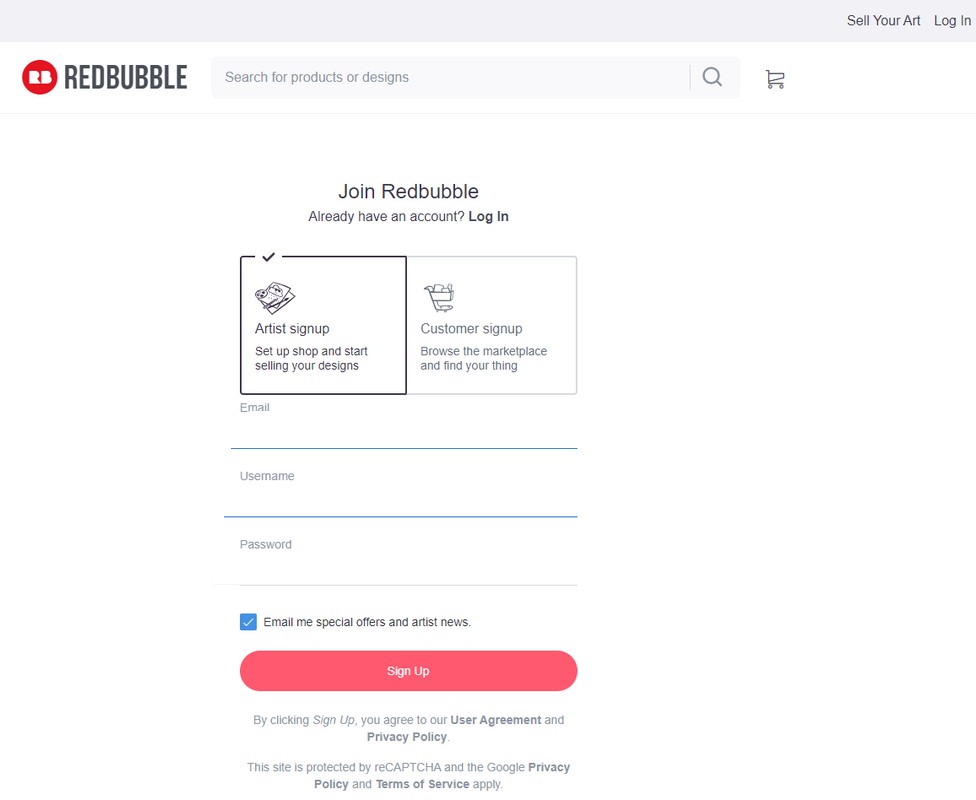
Sign up for a Redbubble account if you don’t already have one. Upload your designs and set up your artist shop with product offerings. Make sure your Redbubble store is fully configured with accurate pricing and product descriptions before attempting integration.
Step 2: Sign Up for Zapier
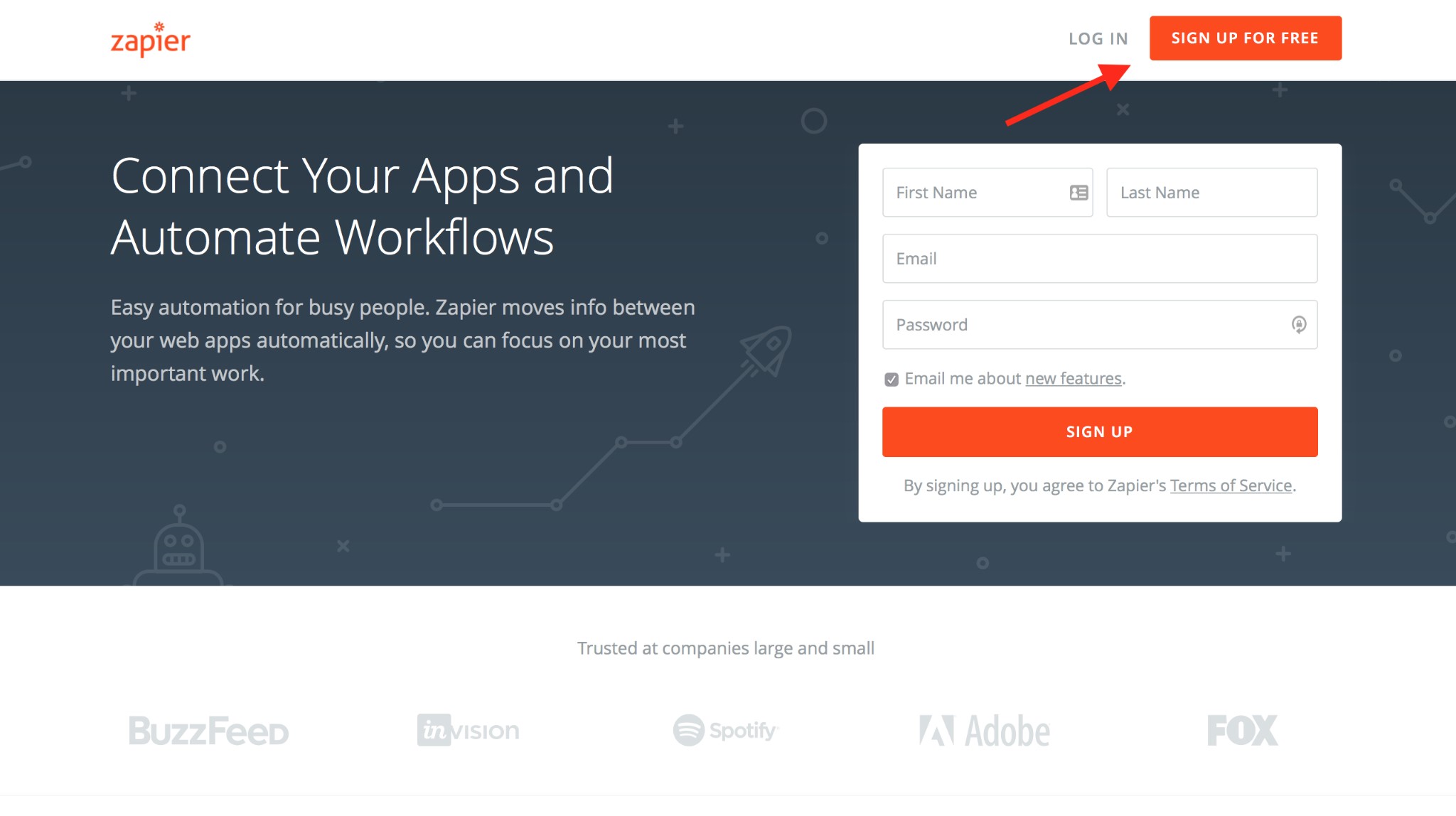
Create a Zapier account at zapier.com. Zapier offers both free and paid plans—the free plan includes limited automation runs (called “Zaps”), while paid plans provide more extensive automation capabilities suitable for growing businesses.
Step 3: Locate Your API Credentials
Navigate to your Zapier dashboard and access the API section. You’ll need to gather API keys from both platforms:
For Shopify:
- Go to Apps > Develop apps > Create an app in your admin panel
- Generate your API credentials and access token
- Save your store URL for configuration
For Redbubble:
- Contact their support team for API access
- Access your developer settings if available
- Store credentials securely for integration setup
Step 4: Connect Your Accounts via API
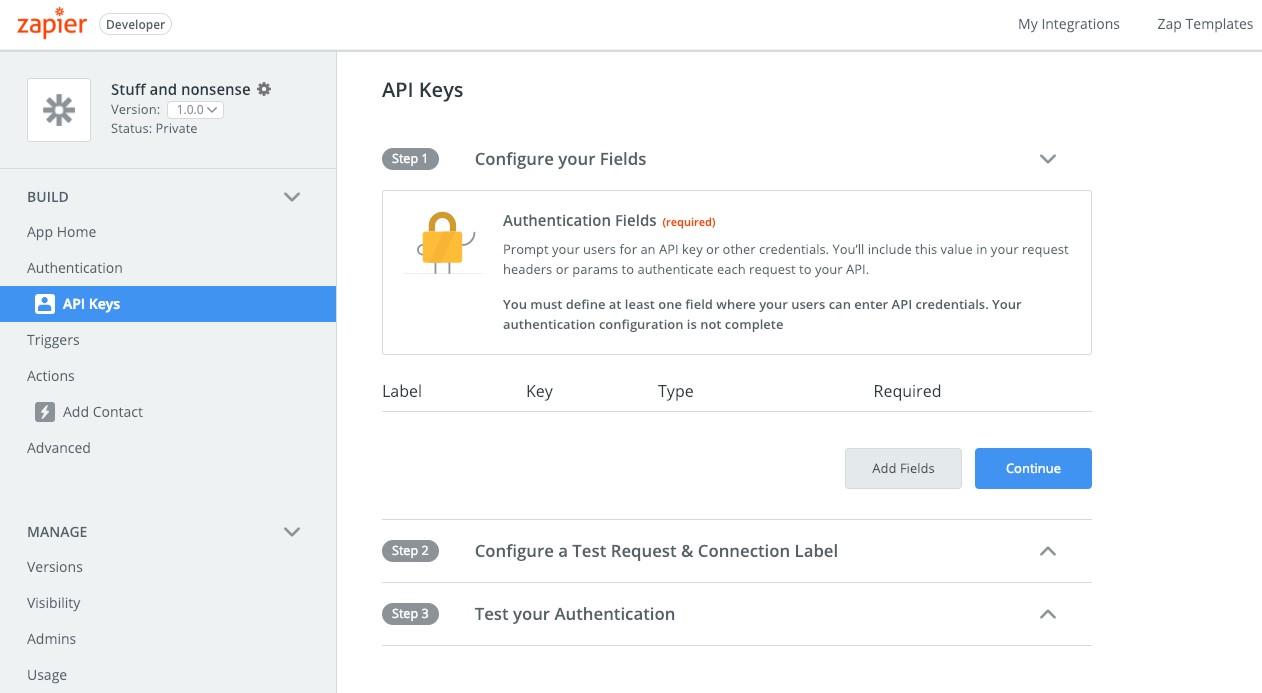
In Zapier, connect both your Redbubble and Shopify accounts. You’ll be prompted to provide:
- Your Redbubble API key
- Your Shopify API key
- Your Shopify password or access token
- Store URL for your Shopify store
Zapier uses these credentials to authenticate and establish secure connections between the platforms.
Step 5: Create a New Zap
Click “Create Zap” in your Zapier dashboard. You’ll set up Redbubble as the “trigger” (the event that starts the automation) and Shopify as the “action” (what happens in response).
Step 6: Configure Your Trigger Event
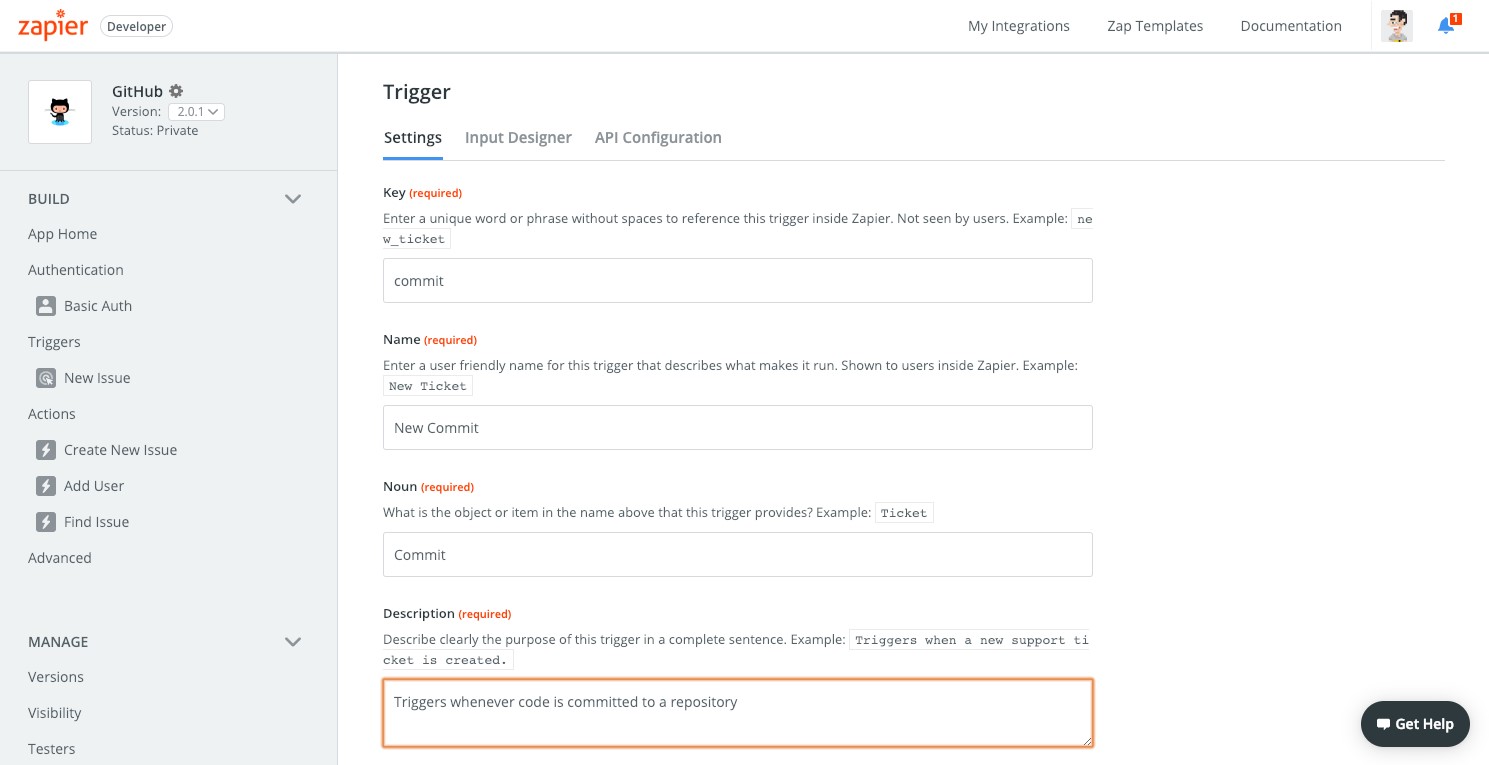
Choose the trigger event that initiates the integration. Common triggers include:
- New Order: Runs whenever a customer places an order on Redbubble
- Order Updated: Triggers when order status changes
- New Product: Activates when you add a new design to Redbubble
Select the trigger that aligns with your business workflow. For most use cases, “New Order” provides the most practical automation.
Step 7: Set Up the Action in Shopify
Configure what happens in Shopify when the trigger fires. Typical actions include:
- Create a new order in Shopify
- Update product inventory
- Add customer information to Shopify database
- Generate order notification
Map the data fields from Redbubble to corresponding fields in Shopify. This ensures information transfers accurately between platforms.
Step 8: Test Your Integration
Before activating your Zap, run thorough tests. Place a test order on Redbubble and verify it appears correctly in your Shopify admin. Check that all data points—customer details, product information, pricing, and order notes—transfer accurately.
Step 9: Activate and Monitor
Once testing confirms everything works properly, turn on your Zap. Monitor the integration closely for the first several days, watching for any errors or data inconsistencies. Zapier provides logs that show each time your automation runs, making it easy to troubleshoot issues.
This Redbubble Shopify setup creates an automated bridge between platforms, saving hours of manual data entry while reducing errors. If this integration process seems complex, partnering with a specialized integration agency can streamline implementation and ensure optimal configuration.
Benefits of Redbubble and Shopify Integration
Connecting Redbubble with Shopify through integration tools delivers multiple strategic advantages for creative businesses:
Unified Management and Centralized Operations
Managing sales, customers, and products from a single dashboard simplifies daily operations dramatically. Rather than logging into multiple platforms to track orders and update inventory, you gain a centralized command center through Shopify. This consolidation reduces the cognitive load on business owners and minimizes the risk of overlooking important orders or customer inquiries.
Greater Control Over Brand Experience
While Redbubble provides an established marketplace, Shopify gives you complete control over your store’s aesthetics, functionality, and customer journey. Through Shopify redbubble integration, you maintain your brand identity while leveraging Redbubble’s production capabilities. This combination lets you create a customized shopping experience that reflects your artistic vision while benefiting from Redbubble’s fulfillment infrastructure.
Enhanced SEO and Organic Traffic
Shopify’s advanced SEO features significantly outperform marketplace-based selling. When you connect redbubble to shopify, you can:
- Optimize product pages with targeted keywords
- Create SEO-friendly URLs that rank in search engines
- Build backlinks to your store for improved authority
- Drive organic traffic that you own, not marketplace-dependent traffic
- Compete directly in search results rather than within marketplace algorithms
This drives sustainable growth through search visibility while reducing dependence on platform-controlled discovery.
Advanced Analytics and Data Insights
Understanding customer behavior becomes far easier with Shopify’s comprehensive analytics. The platform tracks visitor sources, conversion rates, cart abandonment, and customer lifetime value—metrics that help you make informed business decisions. When integrated with Redbubble data, you gain a complete picture of your sales performance across channels.
Increased Sales Potential Through Multiple Channels
By operating on both Redbubble’s marketplace and your own Shopify store, you create multiple pathways for customers to discover and purchase your work. Some customers prefer browsing marketplaces, while others appreciate the curated experience of independent stores. This dual presence maximizes your revenue opportunities without doubling your workload through automated synchronization.
Access to Global Markets
Redbubble already operates internationally, but combining it with Shopify’s multichannel integration capabilities expands your reach even further. Shopify supports multiple currencies, languages, and international shipping options, making it easier to serve customers worldwide.
Streamlined Fulfillment Process
After implementing Redbubble Shopify integration, leverage Redbubble’s print-on-demand fulfillment network while managing everything through Shopify. This eliminates the need for separate fulfillment solutions or expensive ERP integrations. Redbubble handles production, quality control, and shipping while you focus on design and marketing.
Marketing Tool Integration
Shopify integrates seamlessly with marketing platforms, including email automation services, social media advertising tools, and customer relationship management systems. Connect your Redbubble products to powerful marketing workflows unavailable on marketplace platforms alone. This integration capability supports sophisticated campaigns that drive traffic and conversions.
Cost Efficiency and Resource Optimization
Rather than investing in separate systems for inventory management, order processing, and customer data, the Shopify Redbubble connection consolidates these functions. This reduces software costs and eliminates the need to hire separate development teams for multiple platforms.
Practical Use Cases for Redbubble Shopify Integration
Understanding how to use Redbubble with Shopify requires exploring practical applications. Here are five strategic use cases:
1. Selling Physical Products With Custom Designs
Redbubble specializes in custom merchandise—clothing, accessories, home decor, and more. By integrating with Shopify, you can sell customized products through your branded storefront while Redbubble handles production. This model works particularly well for artists, graphic designers, and creative entrepreneurs who want to monetize their designs without managing inventory or fulfillment logistics.
Your customers visit your Shopify store, place orders for custom items, and the integration automatically routes production to Redbubble. This seamless process maintains your brand presence throughout the customer journey while leveraging Redbubble’s manufacturing capabilities.
2. Implementing Print-on-Demand Dropshipping
The integration enables a sophisticated dropshipping model where your Shopify store serves as the customer-facing platform while Redbubble acts as your fulfillment partner. List Redbubble products on Shopify, collect orders, and let Redbubble handle production and direct-to-customer shipping.
This approach eliminates upfront inventory investment and storage costs. You can test new designs, product types, and market segments without financial risk. If a design doesn’t sell, you haven’t lost money on inventory—you simply adjust your catalog and try new concepts.
3. Cross-Selling and Product Bundling
Use the integration to create strategic product bundles and cross-selling opportunities. When customers purchase a t-shirt through your Shopify store, recommend matching accessories or complementary designs. The integration ensures inventory accuracy across both platforms, preventing overselling and customer disappointment.
For example, if someone orders a custom t-shirt, your Shopify store might suggest coordinating tote bags, phone cases, or art prints featuring the same design. This increases average order value while providing customers with cohesive product collections.
4. Personalization and Custom Order Management
The Shopify Redbubble integration facilitates personalized product offerings. Customers can submit custom design requests through your Shopify store, which you then produce through Redbubble’s platform. The integration keeps order details synchronized, ensuring customization specifications transferred accurately.
This works well for businesses offering personalized gifts, custom corporate merchandise, or limited edition artist collaborations. You maintain direct customer relationships through Shopify while utilizing Redbubble’s customization capabilities.
5. Testing and Expanding Product Catalogs
Use the integration to rapidly test new product offerings without significant capital investment. Launch new designs on Redbubble, promote them through your Shopify store, and analyze performance through Shopify’s analytics. This data-driven approach helps you identify winning products before scaling production or investing in inventory.
The flexibility to quickly add or remove products makes it easy to adapt to changing consumer preferences, seasonal trends, or emerging design opportunities. You can expand your catalog strategically based on actual sales data rather than assumptions.
Key Considerations Before Integrating
Before pursuing, can you connect Redbubble to Shopify integration, evaluate these critical factors:
Cost Analysis and ROI Expectations
While Zapier offers a free tier, effective business automation typically requires paid plans. Evaluate:
- Monthly automation tool costs versus time savings
- Potential sales increase from unified management
- Reduction in manual errors and operational costs
- Whether the integration delivers sufficient ROI for your scale
Platform Limitations and Workarounds
Understand that third-party integrations lack the robustness of native connections. Potential limitations include:
- Data synchronization speed delays
- Limited field mapping options
- Automation complexity restrictions
- Need for workarounds to maintain smooth operations
Identify these constraints early and plan accordingly.
Customer Experience and Brand Consistency
Ensure the integration doesn’t create confusion in your customer experience. Orders should process smoothly regardless of whether fulfillment happens through Redbubble or other channels. Maintain consistent branding, communication, and service quality across all touchpoints.
Scalability and Growth Planning
Consider how the integration will scale as your business grows. Important questions to address:
- Will the automation handle increased order volumes?
- Does your Zapier plan support your projected monthly operations?
- Can the integration accommodate catalog expansion?
- What happens when you reach automation limits?
Plan for growth to avoid disruptions when your business expands.
Alternative POD Platforms
If Redbubble integration proves too complex, evaluate alternative print-on-demand services with native Shopify integration. Platforms like Printful, Printify, and others offer seamless connections explicitly built for Shopify, potentially simplifying your operations while delivering similar capabilities.
Key Takeaways
- Redbubble and Shopify don’t offer direct integration, but third-party tools like Zapier create effective connections for order synchronization and inventory management.
- The integration enables centralized management through Shopify while leveraging Redbubble’s print-on-demand fulfillment network, reducing operational complexity for creative businesses.
- Strategic benefits include enhanced brand control, improved SEO capabilities, access to advanced analytics, and the ability to sell across multiple channels simultaneously.
- Implementation requires technical knowledge of API integration and automation configuration—businesses without in-house expertise should consider professional integration services.
- Success depends on careful planning around cost-benefit analysis, understanding platform limitations, maintaining customer experience quality, and ensuring scalability as your business grows.
Conclusion
Does Redbubble integrate with Shopify? Not through native channels, but third-party automation tools provide functional integration that serves thousands of creative entrepreneurs effectively.
While implementing Redbubble Shopify integration involves technical complexity, the strategic advantages can significantly benefit your business. You gain Shopify’s powerful e-commerce features while accessing Redbubble’s production infrastructure, letting you focus on creating compelling designs and growing your audience.
Ready to connect Redbubble with Shopify? Start by mapping your integration requirements and determining whether you need professional support. If you’re looking for expert guidance, contact our team to discuss how we can optimize your e-commerce operations.
Common Questions About Redbubble Shopify Integration
Is Redbubble Good for Inventory Management With Shopify?
Redbubble operates on a print-on-demand model, meaning they don’t maintain standing inventory of products. When integrated with Shopify, you’ll still need Shopify’s inventory management tools to track product availability and coordinate fulfillment.
The integration can automate inventory synchronization to some degree, ensuring your Shopify store reflects product availability on Redbubble. However, for businesses with large, complex catalogs or those needing robust inventory forecasting, supplementing with dedicated inventory management software may prove beneficial.
What Are Redbubble Listings in Shopify?
When you implement can you integrate redbubble products on shopify, “Redbubble listings” refers to products from your Redbubble catalog that you’ve imported into your Shopify store. These products appear in your Shopify catalog alongside any other items you sell, but fulfillment routes through Redbubble when customers purchase them.
The integration allows you to organize these listings within your Shopify store structure, categorize them, and present them as part of your cohesive product offering. When orders come through, the automation sends necessary details to Redbubble for production and shipping, with you earning the artist margin on each sale.
Can You Use Shopify With a Print-on-Demand Service Like Redbubble?
Yes, you can absolutely use Shopify with print-on-demand services like Redbubble. Many successful creative entrepreneurs operate this exact business model. The integration connects your customer-facing Shopify store with Redbubble’s production backend.
While Redbubble doesn’t offer native Shopify integration like services such as Printful do, the workaround through Zapier or similar automation tools provides comparable functionality. Products are printed and shipped on an as-ordered basis rather than being pre-produced and warehoused, giving you the flexibility of POD without inventory risk.
Do I Need Technical Skills for This Integration?
Setting up does redbubble integrate with shopify connections requires moderate technical knowledge. You’ll need to understand:
- How to access and manage API credentials
- How to configure automation workflows in Zapier
- How to map data fields between different platforms
- Basic troubleshooting for connection issues
For businesses without technical expertise, working with a Shopify development company or integration specialist ensures smooth implementation with custom configuration, ongoing maintenance, and troubleshooting support.
Will Integration Issues Affect My Theme?
Integration connections through APIs and automation tools typically don’t directly impact your Shopify theme’s functionality. However, poorly configured integrations can occasionally cause conflicts with theme elements or third-party apps.
If you experience theme-related issues after implementing Shopify Redbubble integration, consulting with a Shopify theme development company can help identify and resolve conflicts. These specialists can ensure your integration works harmoniously with your chosen theme without compromising design or user experience.
Source: https://ecommerce.folio3.com/blog/redbubble-shopify-integration/