
JBL FLIP 5, Waterproof Portable Bluetooth Speaker, Black, Small
$84.99 (as of April 10, 2026 08:11 GMT +00:00 - More infoProduct prices and availability are accurate as of the date/time indicated and are subject to change. Any price and availability information displayed on [relevant Amazon Site(s), as applicable] at the time of purchase will apply to the purchase of this product.)Your Etsy shop is growing, but Etsy’s fees, limited branding, and restricted customer data are starting to hold you back. If you’re considering an Etsy to Shopify migration, you’re not alone. Thousands of sellers make this move every year to gain full control over their storefronts, customer relationships, and long-term revenue.
This guide covers every step of the transfer process, from pre-migration planning to post-launch, so you can switch platforms without losing products, orders, or organic traffic.

Summary
- Etsy limits your branding, fee structure, and direct customer access — Shopify removes all three constraints.
- Three main methods exist for moving from Etsy to Shopify: manual CSV export, migration apps, and hiring a migration service.
- Your product listings, customer data, and order history can all be transferred — but the process requires careful preparation.
- Etsy SEO and Shopify SEO are different; a proper URL redirect and keyword strategy is essential post-migration.
- Running both stores in parallel during the transition protects your revenue while you finalize the Shopify setup.
Why Sellers Move from Etsy to Shopify
Etsy is a strong launchpad, but it’s a marketplace — not a standalone store. Over time, its constraints become real friction. Transaction fees sit at 6.5% per sale, you can’t access customer emails for remarketing, branding is heavily restricted, and your visibility depends entirely on Etsy’s algorithm rather than your own marketing.
Shopify removes all of that. You get a fully owned storefront, your own domain, direct customer data, and a checkout experience you control entirely.
| Factor | Etsy | Shopify |
| Transaction Fee | 6.5% per sale | 0–2% (plan dependent) |
| Custom Domain | No | Yes |
| Customer Email Access | No | Yes |
| Branding Control | Limited | Full |
| Scalability | Marketplace-dependent | Platform-independent |
What You Can (and Can’t) Transfer
Before starting your migration from Etsy to Shopify, it helps to know what data moves over — and what doesn’t.
What Transfers Easily
Product listings (titles, descriptions, images, prices, and tags) export cleanly via Etsy’s built-in CSV download. Customer names and order history can be exported as well, though email addresses are restricted by Etsy’s privacy policy.
What Requires Extra Work
Reviews don’t transfer automatically. Etsy’s review system is platform-specific, so you’ll need to rebuild social proof on Shopify using an app like Judge.me. Your Etsy shop URL and SEO authority also don’t carry over, which makes redirect planning critical.
Data Transfer Overview
| Data Type | Transferable | Notes |
| Product listings | Yes | Via CSV or migration app |
| Product images | Yes | Must re-upload or use the app |
| Order history | Partial | No customer emails |
| Customer reviews | No | Rebuild natively |
| Etsy SEO rankings | No | Requires a redirect strategy |
| Shop URL / domain | No | Set up a new domain in Shopify |
Three Methods to Transfer Your Etsy Shop to Shopify
There’s no single “right” method. Your choice depends on catalog size, technical comfort level, and budget.
Method 1: Manual CSV Export and Import
This is the most hands-on approach and works best for stores with under 100 products. Download your product data from Etsy’s Shop Manager under the “Listings” section, then import it directly into Shopify’s product importer.
The process is free, but the Etsy CSV format doesn’t map perfectly to Shopify’s template. You’ll need to clean up the spreadsheet — removing Etsy-specific fields, reformatting variant columns, and ensuring image URLs are correct — before uploading. Expect to spend several hours on a mid-size catalog.
Method 2: Migration Apps
Apps like Cart2Cart, LitExtension, and Matrixify (formerly Excelify) automate most of the data mapping and transfer. These tools handle product variants, images, customer records, and some order history with minimal manual effort.
Most migration apps charge a one-time or subscription fee based on the number of records transferred. For stores with 100–1,000 products, a migration app typically costs between $30 and $200 and cuts transfer time significantly. This is the most popular approach for the Etsy to Shopify migration process.
Method 3: Hire a Migration Service
For large catalogs, stores with significant order history, or sellers who want SEO continuity and custom theme development handled simultaneously, a professional Etsy to Shopify migration service removes the risk. Services like Folio3’s Shopify migration team handle data validation, redirect mapping, theme setup, and post-launch QA.
| Method | Best For | Estimated Cost | Time Required |
| Manual CSV | <100 products, technical sellers | Free | 4–10 hours |
| Migration App | 100–1,000 products | $30–$200 | 1–4 hours |
| Migration Service | Large or complex stores | Custom quote | Minimal effort for seller |
Step-by-Step Etsy to Shopify Migration Guide
Now that you’ve chosen your method, here’s the complete transfer process.
Step 1: Audit Your Etsy Store
Before exporting anything, clean up your listings. Remove discontinued products, consolidate duplicates, and note your top performers by traffic and revenue. Document your current Etsy SEO tags and keyword patterns — you’ll need to rebuild this architecture in Shopify.
Step 2: Set Up Your Shopify Store
Create your Shopify account and select a plan. Choose a theme that fits your brand — the free Dawn theme is a strong starting point. Set up your core pages (About, Contact, Shipping, Returns) before importing product data, and connect your custom domain so the store is fully structured before launch.
Step 3: Export Your Etsy Data
In Etsy’s Shop Manager, navigate to Settings > Options > Download Data and export your listings as a CSV. Also export orders and customer data from the Orders section. Store all files locally before beginning any imports.
Step 4: Import Data into Shopify
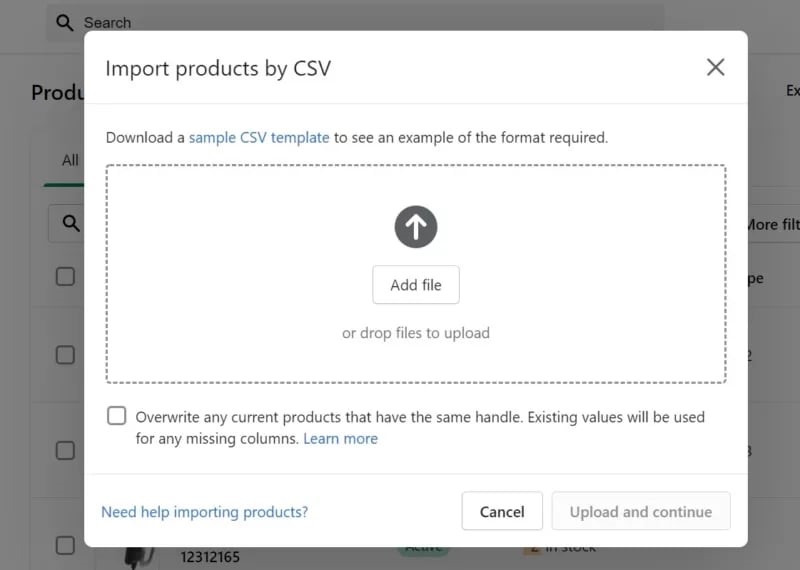
Using your chosen method, import product listings into Shopify. If using CSV, refer to Shopify’s data migration guide to ensure column headers match Shopify’s required format. Re-upload product images as needed and review each listing for accuracy after import.
Step 5: Set Up 301 Redirects
This step is frequently skipped and it’s one of the most expensive mistakes sellers make. Your Etsy listings have accumulated backlinks and search equity. Implementing 301 redirects from old Etsy URLs to the corresponding Shopify pages preserves that SEO value wherever possible.
Within Shopify, use “URL Redirects” under Online Store > Navigation to map old paths to new ones. Update your Google Search Console sitemap promptly so Google reindexes the new structure.
Step 6: Rebuild Your SEO and Product Strategy
Etsy SEO relies on tag-based marketplace search. Shopify SEO is standard web SEO — titles, meta descriptions, page speed, and backlinks. Rewrite product titles and descriptions with Shopify-friendly keyword targeting rather than Etsy tag optimization.
Review the meta title and description for every major product page, add structured product schema, and submit your sitemap to Google Search Console within 48 hours of launch.
Step 7: Run Both Stores in Parallel
Don’t close your Etsy shop on migration day. Keep it active for 2–4 weeks while your Shopify store stabilizes and you fulfill any outstanding orders. Update your Etsy shop announcement with a link to your new Shopify domain so existing customers know where to find you.
Common Mistakes to Avoid When Moving from Etsy to Shopify
Skipping the redirect setup is the most common mistake. Without 301 redirects, Google treats your Shopify product pages as brand new, wiping any existing domain equity. Failing to rebuild product SEO for Shopify’s algorithm (vs. Etsy’s tag system) compounds the traffic loss.
Test your checkout before launch — payment gateway setup, shipping rates, and tax settings all need verification via test transactions. For post-migration optimization, best practices to optimize Shopify for mobile are critical, since most Etsy buyers browse on mobile.
Post-Migration Checklist
Once your Shopify store is live, complete these steps within the first 30 days: submit your sitemap to Google Search Console, verify all 301 redirects are working, set up Google Analytics 4, install a review app (Judge.me or Yotpo), connect your email marketing platform, and test checkout on both desktop and mobile.
For stores integrating email tools, automating your Shopify email marketing with Flodesk is a strong starting point for former Etsy sellers looking to build direct customer relationships.
How Much Does an Etsy to Shopify Migration Cost?
A manual migration costs only your time. Migration apps range from $30 to $200. A professional service — including data transfer, redirects, theme setup, and QA — starts at a few hundred dollars for small stores and scales with complexity.
Ongoing Shopify costs include the Basic plan at $29/month and transaction fees of 0.5–2% (waived with Shopify Payments). Most sellers find that dropping Etsy’s 6.5% per-sale fee quickly offsets the monthly Shopify subscription at meaningful volume.
Key Takeaways
- The Etsy to Shopify migration process involves exporting your listings, setting up a Shopify store, importing data, and building a redirect strategy — in that order.
- Migration apps are the most efficient option for most stores; manual CSV works for small catalogs, while a professional service suits complex or large stores.
- Etsy reviews don’t transfer — plan to rebuild social proof on Shopify from day one.
- 301 redirects and Shopify-specific SEO setup are not optional; skipping them will cost you organic traffic.
- Running both stores in parallel for 2–4 weeks after launch protects revenue during the transition period.
Conclusion
Moving from Etsy to Shopify is one of the most impactful decisions a growing seller can make — but only if the migration is done correctly. Follow the step-by-step process in this guide to protect your products, preserve your SEO equity, and launch a Shopify store that actually performs from day one.
If you want the migration handled without the risk of data loss or ranking drops, talk to Folio3’s Shopify migration experts for a free consultation and project estimate.
Frequently Asked Questions
Can You Transfer Your Etsy Shop to Shopify?
Yes. You can transfer products, order history, and some customer data from Etsy to Shopify using a CSV export, a migration app, or a professional migration service. Etsy reviews and customer emails are not transferable due to platform restrictions.
How Long Does an Etsy to Shopify Migration Take?
A small store (under 100 products) can be migrated manually in one day. Using a migration app cuts active work to a few hours. A full-service migration with theme setup and SEO configuration typically takes 1–3 weeks depending on catalog size and custom requirements.
Will My Etsy Reviews Transfer to Shopify?
No. Etsy reviews are tied to the Etsy platform and cannot be exported. You’ll need to rebuild reviews on Shopify using a dedicated app. Some apps let you manually import review content from screenshots or CSV files.
Should I Close My Etsy Shop After Migrating?
Not immediately. Keep your Etsy store active for at least 2–4 weeks after your Shopify store goes live. Use your Etsy shop announcement to direct customers to your new domain. This protects ongoing sales and order fulfillment during the transition.
Does the Etsy to Shopify Migration Affect SEO?
Yes. Your Etsy listings have no direct URL authority that transfers to Shopify. However, setting up proper 301 redirects, rewriting product SEO for Shopify’s algorithm, and submitting your sitemap to Google Search Console minimizes traffic loss during the migration from Etsy to Shopify.
What Data Can I Export from Etsy?
You can export product listings (titles, descriptions, prices, tags, and images), order history, and basic customer names and addresses. Etsy does not allow merchants to export customer email addresses due to its privacy and data policies.
Source: https://ecommerce.folio3.com/blog/etsy-to-shopify-migration/