
Plaud Note Pro AI Voice Recorder, Transcribe & Summarize with AI, App Control, Note Taker for Meetings & Calls, Supports 112 Languages, Ultra-Slim w/InstantView Display, Case Included, Black
$189.00 (as of March 22, 2026 05:43 GMT +00:00 - More infoProduct prices and availability are accurate as of the date/time indicated and are subject to change. Any price and availability information displayed on [relevant Amazon Site(s), as applicable] at the time of purchase will apply to the purchase of this product.)Traditional e-commerce platforms often lock you into rigid templates and limited customization. BigCommerce Catalyst breaks this pattern by offering a modern headless storefront framework that gives developers complete creative control while maintaining the reliability of an enterprise backend. This React-based reference architecture eliminates months of development time by providing production-ready components, built-in performance optimization, and flexible deployment options that scale with your business needs.
This guide walks you through Catalyst’s core architecture, technical capabilities, implementation strategies, and real-world use cases to help you evaluate whether this framework aligns with your development roadmap and business objectives.
Summary
- Architecture overview: Understand how Catalyst combines Next.js, React, and GraphQL with BigCommerce’s backend APIs
- Technical features: Explore built-in component libraries, performance optimization tools, and multi-channel capabilities
- Implementation approach: Learn deployment options, customization workflows, and integration requirements
- Business value: Evaluate ROI through faster time-to-market, reduced development costs, and enhanced customer experiences
- Decision framework: Compare Catalyst against traditional platforms and assess readiness for headless commerce adoption
What Is BigCommerce Catalyst?
BigCommerce Catalyst represents a production-ready headless storefront framework built specifically for modern e-commerce development. Unlike traditional monolithic platforms, Catalyst separates the frontend presentation layer from the backend commerce engine, giving development teams complete flexibility to create custom shopping experiences.
The framework ships with pre-built React components, GraphQL integration, and automated deployment pipelines that eliminate common headless development challenges. Teams can launch a functional storefront in days rather than months, then customize every aspect of the user interface without touching backend infrastructure.
Core Technical Foundation
Catalyst builds on Next.js 14 with React Server Components, delivering exceptional performance through server-side rendering and automatic code splitting. The framework connects to BigCommerce’s GraphQL Storefront API, providing access to product catalogs, cart management, checkout flows, and customer data through a type-safe interface.
Developer experience remains central to Catalyst’s design philosophy. The codebase includes TypeScript support, comprehensive documentation, and modular component architecture that simplifies maintenance and scaling. Teams inherit BigCommerce’s proven commerce logic while gaining freedom to experiment with frontend innovation.
Why Businesses Choose Catalyst BigCommerce
Organizations migrate to Catalyst when traditional platform constraints limit their competitive positioning. The framework solves specific pain points that affect conversion rates, operational efficiency, and market differentiation.
Speed to Market
Traditional platform customizations often require extensive theme modifications and plugin dependencies that increase technical debt. Catalyst eliminates this friction by providing battle-tested components that handle common e-commerce patterns out of the box. Development teams focus on brand differentiation rather than rebuilding basic functionality.
A typical Catalyst implementation launches in 6-8 weeks compared to 4-6 months for custom headless builds. This acceleration stems from pre-configured infrastructure, built-in best practices, and streamlined deployment workflows that remove guesswork from the development process.
Performance Optimization
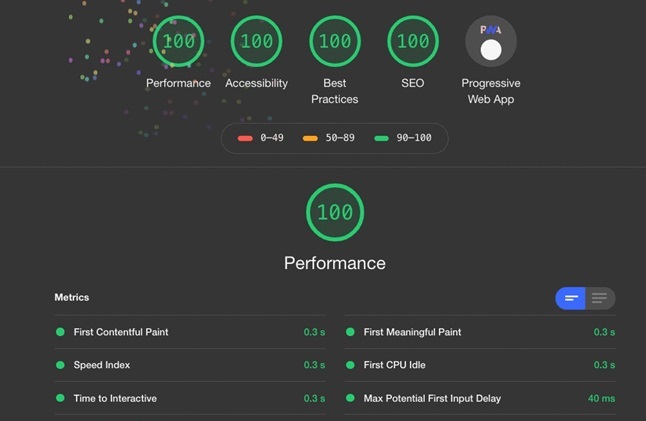
Page speed directly impacts revenue, with every 100ms delay reducing conversion rates by approximately 7%. Catalyst addresses this through aggressive performance optimization, including automatic image optimization, lazy loading, edge caching, and minimal JavaScript payloads.
The framework achieves Lighthouse scores above 90 in most implementations, translating to faster load times, improved search rankings, and better mobile experiences. Businesses report conversion lift between 15-30% after migrating from legacy platforms to Catalyst-powered storefronts.
Customization Without Limits
Traditional platforms force compromise between functionality and design. BigCommerce Catalyst development agency teams leverage the framework’s composable architecture to build exactly what clients envision without platform restrictions.
Every component accepts custom styling, behavior modifications, and third-party integrations. Teams can replace entire sections with alternative implementations while maintaining compatibility with BigCommerce’s commerce APIs. This flexibility supports unique brand experiences that stand out in crowded markets.
Catalyst BigCommerce Headless Architecture Explained
Understanding Catalyst’s technical architecture helps teams plan implementations and evaluate compatibility with existing infrastructure.
Frontend Framework Stack
| Component | Technology | Purpose |
| UI Framework | React 18+ | Component-based interface development |
| Application Framework | Next.js 14 | Server-side rendering and routing |
| Styling System | Tailwind CSS | Utility-first responsive design |
| Type Safety | TypeScript | Enhanced code quality and IDE support |
The frontend stack prioritizes developer experience and performance. React Server Components minimize client-side JavaScript while maintaining interactivity. Next.js handles routing, data fetching, and deployment optimization automatically.
Backend Integration Layer
Catalyst connects to BigCommerce through GraphQL Storefront API, providing real-time access to:
- Product catalog with variants, options, and inventory
- Customer authentication and profile management
- Cart operations and checkout orchestration
- Order history and account management
- Multi-currency and internationalization
The API-first approach means frontend changes never require backend modifications. Teams can iterate quickly on user experience improvements while maintaining data consistency and business logic integrity.
Deployment Flexibility
Unlike traditional hosted platforms, Catalyst supports multiple deployment targets. Teams choose infrastructure based on performance requirements, budget constraints, and operational preferences.
| Platform | Best For | Key Benefits |
| Vercel | Rapid deployment | Automatic scaling, edge network, zero configuration |
| Netlify | JAMstack workflows | Built-in CDN, preview deployments, form handling |
| AWS/GCP | Enterprise control | Custom infrastructure, compliance requirements, cost optimization |
| Self-hosted | Full ownership | Complete control, existing infrastructure integration |
Now that we’ve covered the architectural foundation, let’s explore practical implementation strategies that accelerate development timelines.
Implementing BigCommerce Catalyst: Step-by-Step Approach
Successful Catalyst implementations follow a structured methodology that balances speed with quality. This framework reduces common pitfalls and establishes clear milestones throughout the development process.
Phase 1: Planning and Assessment
Start by auditing current platform limitations and defining success metrics. Document required integrations, custom functionality, and content migration needs. This assessment typically takes 1-2 weeks and prevents scope creep during development.
Key activities include stakeholder interviews, technical requirements documentation, and infrastructure planning. Teams should identify third-party dependencies early since integration complexity often determines timeline and budget.
Phase 2: Environment Setup
Catalyst provides a starter template through the BigCommerce CLI that generates a complete project structure with configured dependencies. Developers run a single command to create a local development environment that mirrors production infrastructure.
The setup includes:
- Pre-configured GraphQL client with type generation
- Sample components demonstrating best practices
- Testing framework with example test suites
- Environment configuration for multiple deployment targets
- CI/CD pipeline templates for automated deployments
This standardization eliminates weeks of boilerplate development and ensures consistency across team members.
Phase 3: Customization and Development
Development teams work in parallel on different storefront sections using Catalyst’s modular component system. The framework’s isolation between components prevents conflicts and enables rapid iteration.
Common customization areas include:
- Product Display Pages: Teams modify layouts, add comparison tools, implement dynamic pricing displays, or integrate AR/VR experiences. Catalyst’s component props system makes these changes predictable and testable.
- Checkout Flows: While BigCommerce handles payment processing and order creation, teams customize the checkout UI to match brand guidelines and optimize conversion funnels.
- Content Integration: Catalyst connects seamlessly with headless CMS platforms like Contentful, Sanity, or Contentstack. Marketing teams manage promotional content independently while developers focus on functionality.
Phase 4: Testing and Quality Assurance
Catalyst includes a built-in testing infrastructure that covers unit tests, integration tests, and end-to-end workflows. Automated testing catches regressions before they reach production and maintains code quality as teams scale.
Performance testing receives particular attention. Teams validate Core Web Vitals scores, test under realistic network conditions, and verify responsive behavior across device types. This rigor prevents post-launch performance surprises that damage conversion rates.
Phase 5: Deployment and Monitoring
Deployment complexity varies by infrastructure choice, but Catalyst simplifies the process through automated pipelines. Teams typically establish staging and production environments with preview deployments for every pull request.
Post-launch monitoring tracks:
- Real user performance metrics
- Error rates and exception handling
- API response times and rate limit usage
- Conversion funnel analytics
- Search console data and ranking changes
This data informs ongoing optimization and validates initial implementation decisions.
BigCommerce Catalyst Development Agency: When to Partner
Building expertise in headless commerce requires significant investment in learning modern JavaScript frameworks, API architecture, and performance optimization techniques. Many organizations accelerate results by partnering with specialized agencies.
In-House vs Agency Development
| Approach | Advantages | Considerations |
| In-house team | Deep product knowledge, ongoing support, cost control over time | Learning curve, resource allocation, slower initial delivery |
| Agency partnership | Immediate expertise, proven methodologies, faster launch | Higher upfront cost, knowledge transfer requirements, vendor dependency |
| Hybrid model | Skill development, risk mitigation, flexible scaling | Coordination overhead, clear role definition needed |
Organizations with existing development teams often choose hybrid approaches where agencies handle initial implementation while internal teams learn Catalyst’s architecture through knowledge transfer sessions.
Selecting the Right Partner
Evaluate potential partners based on demonstrated Catalyst experience, not general BigCommerce knowledge. Request case studies showing performance improvements, timeline accuracy, and post-launch support quality.
Strong agencies provide:
- Detailed technical discovery and architecture planning
- Regular communication and milestone tracking
- Code quality standards and documentation
- Performance benchmarking and optimization
- Training for internal teams
- Post-launch support and maintenance agreements
The investment in a qualified BigCommerce Catalyst development agency typically pays for itself through reduced time-to-market and avoidance of costly architectural mistakes that require refactoring.
Moving beyond implementation logistics, let’s examine how Catalyst compares to alternative approaches in the headless commerce landscape.
Catalyst vs Traditional BigCommerce Storefronts
Traditional BigCommerce storefronts use the Stencil theme engine, which provides customization capabilities but operates within a monolithic architecture. Understanding these differences helps teams make informed platform decisions.
Flexibility and Control
Stencil themes offer extensive customization through Handlebars templates, custom CSS, and JavaScript modifications. However, fundamental changes to checkout flows, page layouts, or API integrations require workarounds that increase complexity.
Catalyst removes these barriers by giving developers complete control over frontend implementation. Teams can integrate any JavaScript library, implement custom routing logic, or completely redesign user journeys without platform constraints.
Performance Characteristics
Traditional storefronts deliver respectable performance for standard implementations but struggle with complex customizations. Multiple third-party scripts, theme overrides, and app integrations create cumulative performance degradation.
BigCommerce Catalyst headless architecture optimizes for performance by default. Server-side rendering, intelligent caching, and minimal client-side JavaScript consistently deliver superior Core Web Vitals scores that directly impact SEO rankings and conversion rates.
Development Experience
Stencil requires learning BigCommerce-specific conventions, template syntax, and deployment processes. While approachable, this knowledge doesn’t transfer to other platforms or modern development workflows.
Catalyst leverages industry-standard tools like React, Next.js, and TypeScript. Skills developed building Catalyst storefronts apply broadly across web development, making it easier to hire talent and maintain codebases long-term.
Total Cost of Ownership
| Cost Factor | Traditional Storefront | Catalyst Headless |
| Initial development | Lower (theme customization) | Higher (custom build) |
| Ongoing maintenance | Moderate (theme updates) | Lower (component isolation) |
| Performance optimization | Requires plugins/optimization | Built-in best practices |
| Scaling costs | Limited by platform | Flexible infrastructure choices |
| Developer efficiency | Theme constraints slow iterations | Modern tooling accelerates development |
Organizations with basic needs may find traditional storefronts sufficient. Businesses requiring differentiated experiences, superior performance, or complex integrations gain long-term value from Catalyst despite higher initial investment.
Real-World Catalyst Use Cases
Catalyst serves diverse business models and industry verticals. These examples illustrate practical applications and outcomes.
B2B Manufacturing
A precision parts manufacturer needed customer-specific pricing, custom quote workflows, and integration with ERP systems. Catalyst enabled complex business logic implementation while maintaining the user experience standards customers expect from consumer brands.
The headless architecture connected multiple backend systems through a unified frontend, reducing order processing time by 40% and improving customer self-service capabilities.
Fashion Retail
A mid-market fashion brand wanted creative control over seasonal campaigns and trend-driven product launches. Traditional platform themes couldn’t support the rapid design iterations their marketing team demanded.
Catalyst empowered the brand to launch weekly themed collections with unique layouts, interactive lookbooks, and social commerce integrations. Conversion rates increased 28% while development costs decreased as the team built a reusable component library.
Multi-Brand Enterprise
An enterprise managing six distinct brands across different product categories needed efficiency without sacrificing brand identity. Catalyst’s composable architecture allowed shared commerce logic while maintaining completely unique frontend experiences.
The implementation reduced infrastructure costs by 35% compared to maintaining separate platform instances while improving site speed across all properties.
Common Implementation Challenges and Solutions
Every technology adoption faces obstacles. Understanding common Catalyst challenges helps teams prepare mitigation strategies.
Challenge: GraphQL Learning Curve
Teams unfamiliar with GraphQL face initial friction learning query syntax, type systems, and performance optimization patterns. This knowledge gap can slow early development sprints.
Solution: Catalyst includes generated TypeScript types and example queries covering common scenarios. Teams typically achieve proficiency within 2-3 weeks by following documentation and reference implementations.
Challenge: Deployment Complexity
Organizations without modern DevOps practices struggle with CI/CD pipeline configuration, environment management, and infrastructure provisioning.
Solution: Vercel and Netlify integrations provide one-click deployment that handles complexity automatically. Teams gain operational maturity gradually while maintaining production stability.
Challenge: Content Management Integration
Marketing teams accustomed to visual page builders may resist headless CMS workflows that separate content authoring from presentation.
Solution: Modern headless CMS platforms offer live preview functionality and visual editing capabilities that match traditional systems. Proper training and gradual rollout ease the transition.
Challenge: Third-Party App Compatibility
BigCommerce’s app marketplace primarily targets traditional storefronts. Catalyst implementations require custom integration work for some apps.
Solution: Most critical functionality (payment processing, shipping, tax calculation) works seamlessly through BigCommerce APIs. Additional features may require direct API integration or alternative service providers designed for headless architectures.
Key Takeaways
- Catalyst delivers production-ready headless commerce infrastructure that reduces custom development time from months to weeks
- The framework combines React, Next.js, and GraphQL with BigCommerce’s enterprise commerce capabilities for optimal flexibility
- Performance optimization comes built-in, consistently achieving superior Core Web Vitals scores that improve conversion rates
- Organizations must evaluate total cost of ownership including initial development, ongoing maintenance, and scaling requirements
- Successful implementations require clear technical requirements, realistic timelines, and either in-house expertise or qualified agency partnership
Conclusion
BigCommerce Catalyst removes traditional barriers between creative vision and technical execution in e-commerce. The framework provides battle-tested infrastructure while preserving the flexibility needed for competitive differentiation. Organizations that prioritize performance, customization, and long-term scalability find Catalyst aligns with modern commerce requirements better than monolithic alternatives.
Whether you’re evaluating headless commerce for the first time or planning migration from legacy systems, Catalyst offers a proven path forward. Ready to explore how Catalyst can transform your e-commerce operations? Connect with our BigCommerce Catalyst development agency to discuss your specific requirements and timeline.
Frequently Asked Questions
What Is the Main Advantage of BigCommerce Catalyst Over Traditional Themes?
Catalyst provides complete frontend control through modern React and Next.js architecture while traditional themes operate within Stencil’s template constraints. This separation enables superior performance, unlimited customization, and faster iteration cycles. Development teams use industry-standard tools instead of platform-specific conventions, improving long-term maintainability and talent acquisition.
How Long Does a Typical BigCommerce Catalyst Implementation Take?
Standard Catalyst implementations require 6-8 weeks from planning through launch, covering environment setup, component customization, integration development, and testing. Complex projects with extensive third-party integrations or custom functionality may extend to 12-16 weeks. Timeline depends heavily on requirements clarity, resource availability, and existing infrastructure.
Can I Migrate My Existing BigCommerce Store to Catalyst?
Yes, migration is straightforward since Catalyst connects to the same BigCommerce backend APIs. Product data, customer information, and order history remain unchanged. The frontend rebuild requires recreating your current design in React components, but you can phase the transition by launching new sections progressively while maintaining your existing storefront.
What Technical Skills Does My Team Need for Catalyst Development?
Teams need proficiency in React, Next.js, TypeScript, and GraphQL. Frontend developers familiar with modern JavaScript frameworks can learn Catalyst quickly through official documentation. Organizations without these capabilities should consider agency partnerships or dedicated training programs before beginning implementation.
Does Catalyst Support Multi-Language and Multi-Currency Capabilities?
Catalyst fully supports BigCommerce’s internationalization features, including multiple currencies, languages, and regional pricing. The framework handles frontend localization through Next.js internationalization routing while BigCommerce manages backend currency conversion and regional compliance requirements. Teams implement language switching and content translation based on their specific market needs.
How Does Catalyst Pricing Compare to Traditional BigCommerce Plans?
BigCommerce subscription costs remain identical regardless of frontend choice. Additional expenses include development resources, hosting infrastructure for the Catalyst frontend, and optional third-party services like headless CMS platforms. While initial development costs exceed theme customization, improved performance and reduced ongoing maintenance often produce positive ROI within 12-18 months.
What Hosting Options Work Best for Catalyst Storefronts?
Vercel offers the simplest deployment experience with automatic scaling and global CDN distribution. Netlify provides similar capabilities with different pricing models. Enterprise organizations often choose AWS or Google Cloud for compliance requirements or infrastructure consolidation. All options support Catalyst equally well, differing primarily in operational complexity and cost structure.
Can Catalyst Integrate With My Existing Marketing Tools and Analytics?
Yes, Catalyst supports standard marketing technology integrations through tag management systems like Google Tag Manager, direct JavaScript implementations, or server-side tracking approaches. The framework provides flexibility to implement tracking exactly as needed while maintaining performance. Most organizations successfully migrate existing analytics, personalization, and advertising integrations without functionality loss.
Source: https://ecommerce.folio3.com/blog/transforming-headless-commerce-exploring-bigcommerces-catalyst/